
Employee Attendance App with Photo Verification
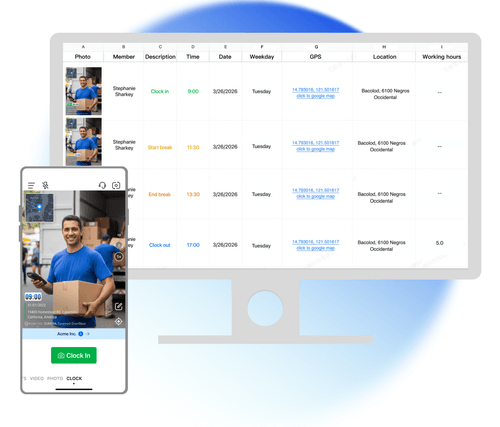
Your crew clocks in and out with a photo that carries time, address, and a Photo Code. No fixed time clock or kiosk is needed. Records from every site sync to Teamspace.
Trusted by 3.7M field pros and teams from











Field attendance built on trust can break down
A normal camera photo can have its timestamp edited. Its location is not fixed to the picture. One worker can also send another worker's photo. A Timemark clock record is a photo taken on the spot with checkable time, address, and a Photo Code.
Key Features
Proof that can be checked later
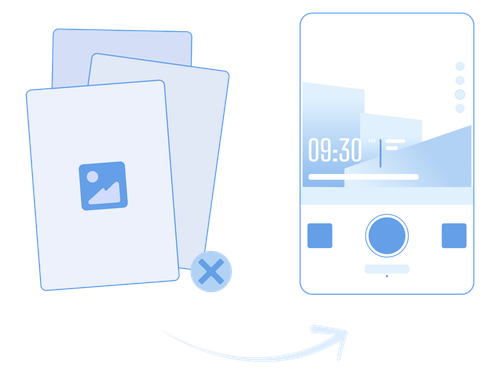
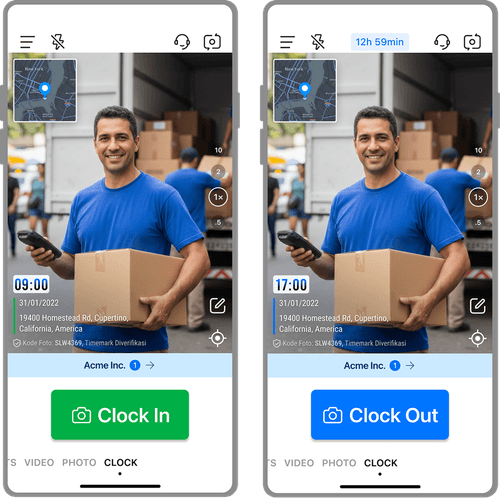
- Taken at the site: Clock photos are taken in the Timemark app and carry the date, time, full address, and a map. A photo cannot be selected from the phone gallery.
- Photo Code verification: Anyone can check the Photo Code at verify.timemark.com or in the app. It shows the original time and location recorded on the server.
- Protected time and location: Photo time comes from network time, not the phone clock. If Timemark detects a changed device clock or a mock GPS location, it issues no Photo Code, so the photo fails verification.
Attendance records for multiple job sites
- Address on every punch: Each punch records the address where it happened. A day across three sites creates three records with three addresses.
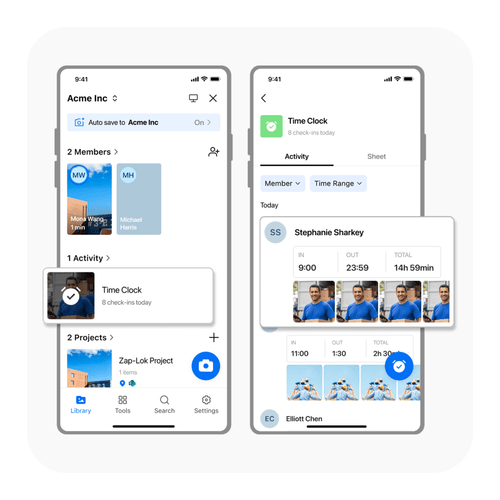
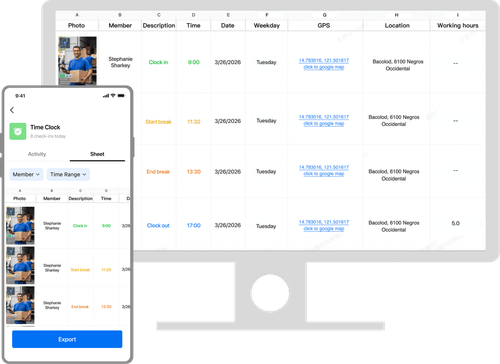
- One place for the crew: Every member's records land in Teamspace under Activity, Time clock, whatever address they were at.
- Local time for each worker: Clock times show in each member's local time. This helps when your field team works across time zones.
Clear hours with each record
- Full shift breakdown: The clock-out photo carries clock-in time, clock-out time, break time, and work time.
- Work time calculated: Work time is calculated with breaks removed. It cannot be edited by hand.
- Team totals: The team Sheet totals hours by member and date, then exports to Excel .xlsx.
How do I track field employee attendance?

1. Get Timemark
- Install Timemark on the phones your crew already uses.

2. Clock in at site
- Each worker takes a clock-in photo where they start work.

3. Breaks and clock out
- Workers record breaks and finish the shift with a clock-out photo.

4. Review in Teamspace
- You review your crew's attendance records in Teamspace, even when you are not on site.
Built for crews away from the office

Construction crews
- Construction crews need attendance records that show who arrived at the job site and when.

Field service
- Field service teams need an attendance record with the address of each customer visit.

Security and patrol
- Security and patrol teams need records that show a worker was at a location at a specific time.

Field sales
- Field sales teams need attendance records from the places where their workday happens.
Attendance records your crew can stand behind

No proxy clock-ins
- One person cannot clock in for another, because the record is a photo of a person at a place at a time. Your manager can check who showed up.

One team record
- Keep one set of hours for the whole crew instead of collecting screenshots and re-typing attendance records.

Same records for both
- Your crew uses phones, while the office reviews the same records in Teamspace. There is no export between tools.
Your team keeps control of attendance records
Each clock record syncs to Teamspace when the phone is online. Who can see attendance follows your team's photo permissions. If a record was made by mistake, it can be removed by the person who made it or in Teamspace. Deleting a photo from the phone's local album does not remove the synced team record.

Anyone Can Check Timemark Photos
Timemark uses network time, so the photo shows the real time even if the phone clock was changed. A Photo Code links the photo to the original time, location, and picture features stored on Timemark's servers. Anyone can check a photo with a code free at verify.timemark.com or with "Verify Photos" in the app.
- The photo shows real time even if the phone clock was changed.
- Fake GPS locations are labeled "Virtual location detected".
- Editing the photo file or metadata does not change the stored record.

What Field Teams Say About Timemark
“I'm a construction contractor, and Timemark changed how we handle field photos. Before, I spent 2 hours every night sorting photos from my team and trying to remember which shot went to which project. Now I have Timemark that auto-adds GPS stamps and organizes everything by project and member.”

“As a telecom contractor, we're always on different job sites, and tracking photos used to be a nightmare. My team would send photos via text or email, and half the time they'd miss location notes. With Timemark, every photo has a GPS stamp and timestamp.”
“Our team covers 20+ sites a day, and Timemark keeps us organized. Every inspection photo has exact time and place. Even new hires pick it up in 5 minutes. It’s reliable, simple, and the only tool we need to prove we did the work right.”
Frequently Asked Questions

Make field attendance easier to check
Give your crew photo-verified attendance records from every site.
Start for free