Best Photo Evidence Solution for Resolving Disputes

Capture photo evidence with Timemark. Take time-stamped photos, speed dispute resolution, ease quality control for field teams, and help protect your paycheck and business.

The interface of the construction photo documentation tool on the web and mobile portal

Trusted by 3.7M field pros and teams from

Charter logoSpectrum logoCoca cola logoUnilever logoSeven eleven logoAIA logoG4S logoCoteccons logoMasTec logoWaskita logo
Charter logoSpectrum logoCoca Cola logoUnilever logoSeven Eleven nlogoWalmart logoG4S logoContecons logoWaskita logoMasTec logo
Why Regular Photos Fall Short

Rework costs hit field teams hard (fixing issues early cuts costs by 25%!), and project delays slow down work. Plus, regular photos’ metadata gets altered easily, making your photo evidence weak when disputes pop up. According to Construction Executive, photos provide key evidence, and the visual context makes a story compelling while reliable evidence makes it persuasive. Without accurate GPS or timestamps, your images lose credibility and fail as proof. For true picture of evidence that holds up under scrutiny, you need every image tagged, timestamped and verifiable.

Timemark is the best tool for field teams who need reliable photo evidence. Every photo is automatically stamped with GPS location and time, so you never have to worry about tampered metadata.

Feature Image

3 Pain Points with Photo Evidence

Service Icon

Lack of Metadata

When photos don’t include accurate time and location metadata, or when metadata can be easily altered, it becomes harder to answer questions like “where was this photo taken?” or “when did this actually occur?”, which can weaken your case or delay dispute resolution.

Service Icon

Manual Metadata is Slow

Trying to add or correct metadata manually is a big burden. On large projects, this means wasted hours, inconsistent tagging, and possible missing photo evidence when disputes arise.

Service Icon

Disorganized Photos Cause Delays

Missing or poorly tagged images can cause delays in payments, inspections and legal claims because teams cannot easily “find location from picture”.

Key Features

See how Timemark tackles pain points with collecting and organizing photo evidence

The interface of Timemark with a timestamped photo. The sync status bar shows “Saved”.

Auto-Tag Photos

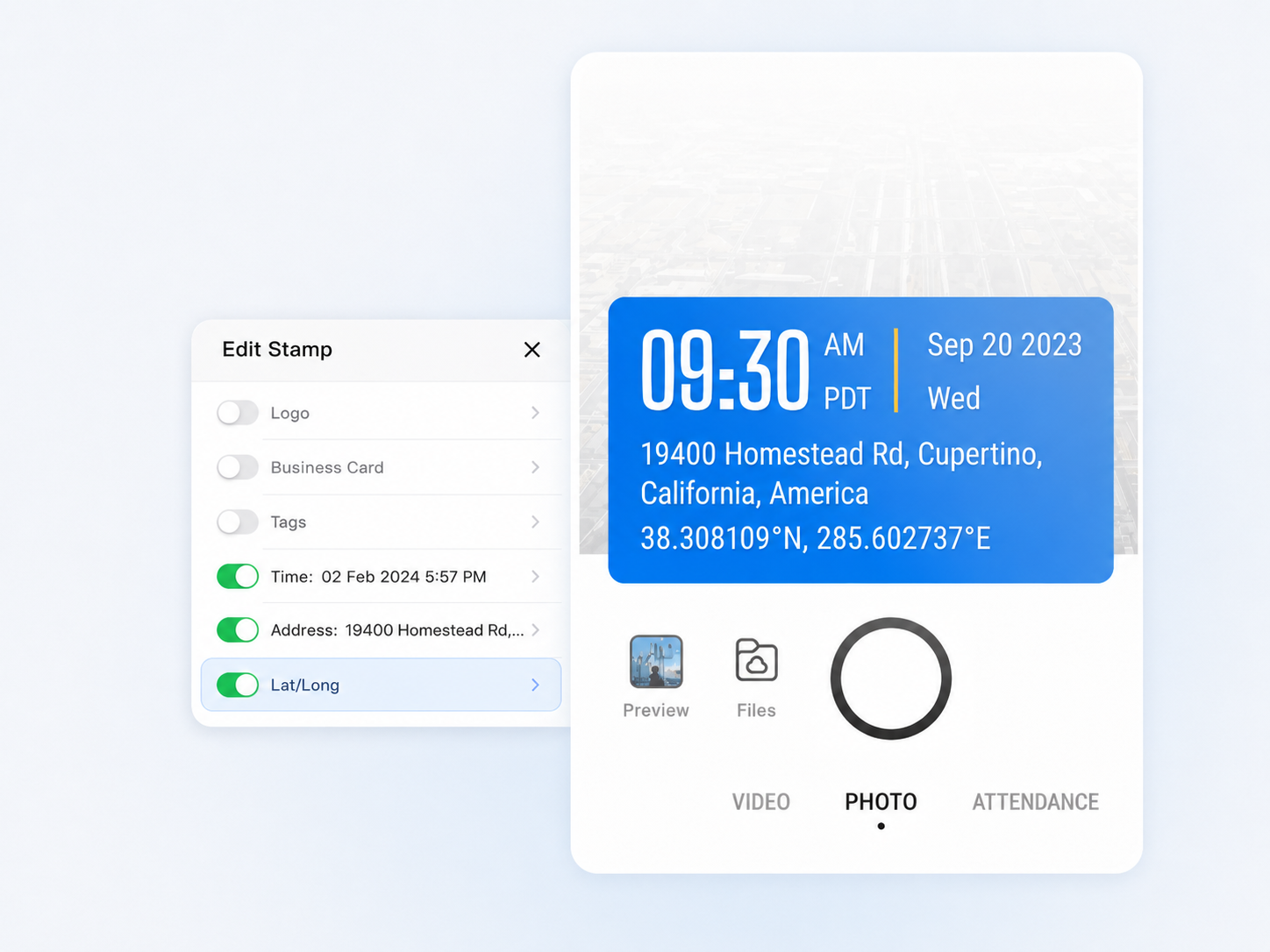
Every photo you take becomes verifiable photo evidence with a precise time and GPS photo location. Unlike regular phone cameras, you never have to dig through metadata or enter info manually.

  • GPS and timestamp data are tamper-proof, even if system time or GPS is manipulated
  • Switch on to add more context such as latitude, longitude, weather, elevation, compass direction, etc.
  • Built-in verification via a unique photo code ensures every picture of evidence is authentic and traceable
The data fields inside the ‘Edit Template’ with the Address field toggled on; all other fields are toggled off including Logo, Business Card, Tags, Weather, Lat/Long, Altitude, and Compass.

View on a Map

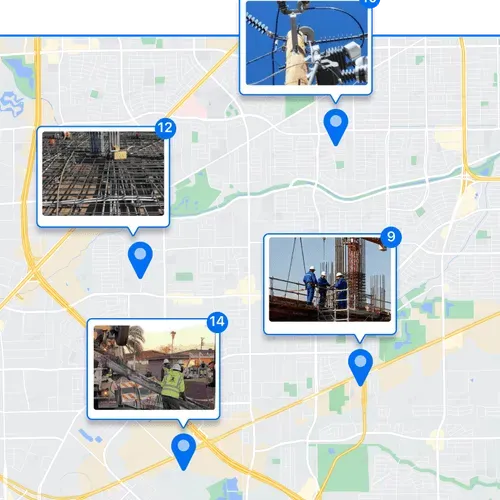
See all your photo evidence on a map to know exactly where work happened. Ideal for remote checks or multi-site projects.
  • Zoom in to examine specific areas or zoom out to view the overall site status at a glance
  • Quickly spot gaps in documentation or track progress remotely
  • Keep all images of evidence organized for easy reference
A photo gallery that has a few photos selected; on the right hand side shows the options to export to Excel or PDF; at the bottom shows the options to share to WhatsApp, export as PDF / ZIP / KMZ.

Quick Professional Reports

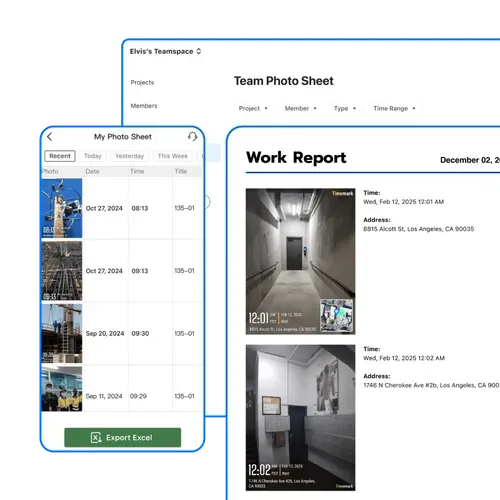
Turn your organized, GPS‑tagged photos into professional reports in minutes. Save time and keep your photo evidence ready for audits, management, or court.
  • Export all GPS photo locations, timestamps, and notes in one file
  • Sort or filter by project, date, or other job details in Excel for fast analysis
  • Maintain verifiable evidence images to share confidently with clients or management
A photo gallery that has a few photos selected; on the right hand side shows the options to export to Excel or PDF; at the bottom shows the options to share to WhatsApp, export as PDF / ZIP / KMZ.

Share a Live Photo Link

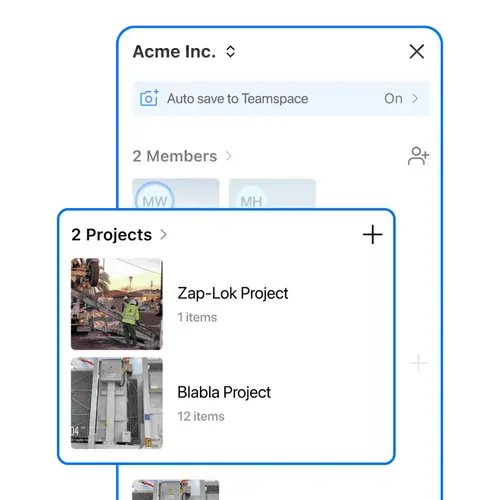
Generate a live gallery link to your photo evidence and share it instantly with your team. No downloads, no attachments, just instant access.

  • View the exact address along other context of each photo in the gallery
  • Combine visual data and written context to streamline documentation
  • Instantly answer “where was this photo taken?” with trustworthy image truth

How to Capture Photo Evidence?

A demonstrative graphic that shows the "capture" button on Timemark
1. Get Timemark App
Go to app stores, find Timemark and download it. Open the app, grant camera and location permissions. That’s it. No complex steps, just a few taps to get ready.
Illustration of a timestamp display showing "09:30 AM". Illustration of a Timemark - like camera interface with timestamp and layout elements.
2. Take Stamped Photo Evidence
Tap the camera button in Timemark to shoot. Every photo gets auto GPS stamps and project tags. No manual edits, just clear proof.
Illustration of a Timemark - like camera interface with timestamp and layout elements.
3. Use It Right Away
Timemark’s design is simple with no training needed. Field teams and managers can capture verifiable photos with GPS, time, and metadata instantly, then locate files effortlessly.
Download Timemark APP

Use Cases

Construction Pros

Lower rework costs and fix disputes fast with Timemark’s photos. It also speeds up project delivery, just like how one team avoided delays.

Image
Legal Teams

Meet admissibility rules without hassle. Its trusted, unchangeable evidence lets you wrap up cases faster.

Image
Insurance/Security Firms

Snap before/after photos for claims or incident reports. Timemark’s unalterable visual proof protects you from fraud and speeds up dispute resolution.

Image

Fun Photo History Bits

Alphonse Bertillon started “mug shots” in the 1800s, making crime photo records a thing! But here’s a truth: photos aren’t just reality, they’re selected pieces. Photographers share tales of missed shots too, proving photo evidence has always had its challenges.

Feature Image
Star IconStar IconStar IconStar IconStar Icon

"Before using Timemark, proving when and where our crew finished work was a nightmare. Now every photo we take has GPS and time proof built in, so there’s no more arguing over site progress. It’s hands down the best tool for collecting solid photo evidence in the field."

Star IconStar IconStar IconStar IconStar Icon

"I use Timemark every day to document soil tests and water samples. The GPS and timestamp make each picture real evidence, not just a random photo. My reports are cleaner, and clients trust the data more."

Star IconStar IconStar IconStar IconStar Icon

"We deal with a lot of warranty claims, and photo proof is everything. Timemark keeps our evidence images organized by project and date, so when clients ask questions, I can pull up proof in seconds. It’s the best for protecting our business from disputes."

Frequently Asked Questions

What makes Timemark’s photo evidence more legally defensible in court than standard camera photos?
Faq Icon
How to ensure my construction photo evidence meets the strict documentation requirements for high-risk projects?
Faq Icon
How to use my photo evidence to prove service completion and prevent payment disputes as a field technician?
Faq Icon
What makes a photo admissible in court?
Faq Icon
How to prevent users from uploading pre-taken or edited photos to falsify evidence?
Faq Icon

Start Your Free Trial. Get Trusted Photo Evidence

Download Timemark free to get reliable photo evidence and professional photo reports. Turn shots into trusted docs for free.