
Store visits can be hard to confirm
A photo sent from elsewhere does not show whether a rep visited the right store at the right time.
BUILT FOR RETAIL TEAMS
Use checklists and timestamped photos so managers can confirm store visits, displays, stock, and opening checks at each location.
✓ Records managers can check by store, time, and task

STORE OPERATIONS MOVE FASTER THAN THE RECORD
Across shifts, locations, campaigns, and incidents, teams need a record that makes the condition, owner, and next action clear.
A photo sent from elsewhere does not show whether a rep visited the right store at the right time.
Without a store checklist, required photos for opening, displays, or stock checks can be missed or reviewed differently.
A photo without the store, task, responsible team, and time makes follow-up slower and less accountable.
Managers spend closing hours collecting, sorting, and explaining evidence that should already be ready for the next shift.
THE MOMENTS THAT CANNOT BE RECREATED
Store conditions, displays, and operating issues change throughout the day. Capture the area, task, team, time, and final condition while it is visible.

Capture shelf availability, stock levels, empty spaces, and product placement before inventory is replenished or moved.

Record spills, damaged products, incorrect displays, safety hazards, or other store issues before they are cleaned up or corrected.

Document displays, promotional materials, pricing, and product placement while the campaign is live to verify in-store execution.
Share verified field records with the storage and automation tools your team already uses.

Automatically send verified jobsite photos and reports to the Google Drive folders your team already uses.

Keep project evidence available in OneDrive so office teams and field teams work from the same record.

Send job events and verified field records to the internal systems and automation tools your team relies on.

Sync verified job photos and field records with the jobs your team manages in Jobber.
RECORD THE STORE AS IT CHANGES
Each store task needs different context. Timemark helps teams capture it while the condition is still visible.
Record displays, pricing, and stock at set times before customers arrive.
Capture the condition, responsible team, corrective action, and completion in one clear record.
Document the store condition, completed tasks, and outstanding work so the next shift starts with context.
ONE TEAMSPACE FOR EVERY STORE
Photos from store teams and visiting reps arrive in Teamspace, organized by store, member, and date, so area and district managers can review a location without asking anyone to resend photos.
Sign up for Teamspace →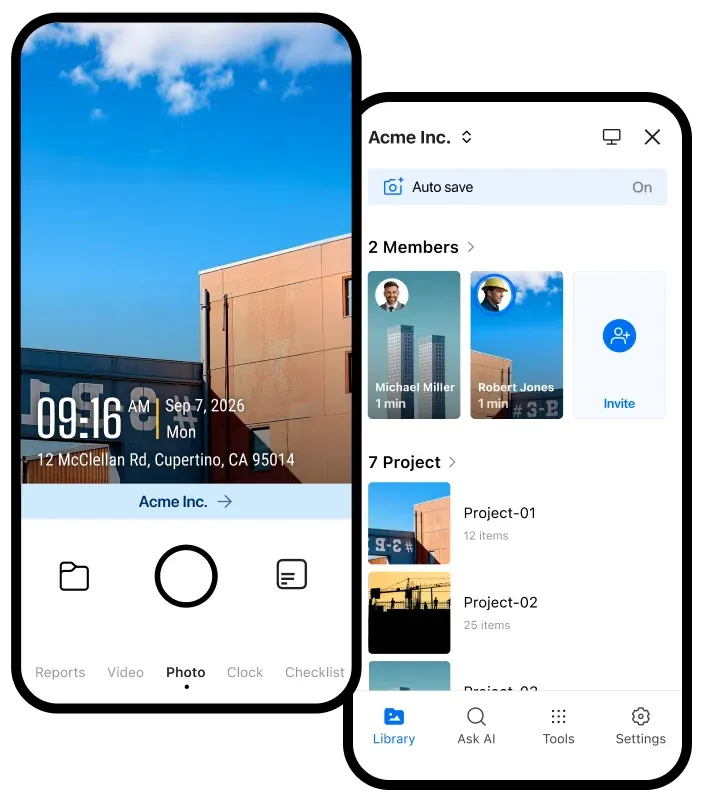
Compare opening checks, displays, and stock photos across stores instead of collecting them from separate chats.
Keep the photo of the issue and the photo of the correction in the same store record, each with its time and the person who took it.
Share a link or export a PDF when head office, a brand partner, or an auditor asks what a store looked like.
STORE OPERATIONS RESOURCES
Practical tools for consistent store checks, photo proof, and clear follow-up across every location.