
App zur Zeiterfassung mit Foto‑Verifizierung
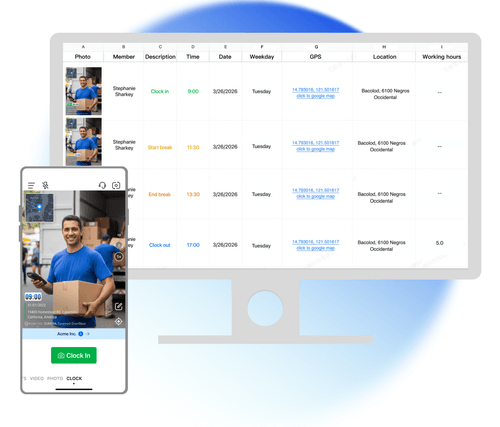
Ihr Team stempelt sich mit einem Foto ein und aus, das Uhrzeit, Adresse und einen Foto-Code enthält. Keine feste Stechuhr und kein Terminal sind nötig. Einträge von jedem Einsatzort werden mit Teamspace synchronisiert.
Trusted by 3.7M field pros and teams from











Zeiterfassung im Außendienst auf Vertrauensbasis kann Probleme machen
Bei einem normalen Kamerafoto kann der Zeitstempel geändert werden. Der Ort ist nicht fest mit dem Bild verbunden. Ein Mitarbeiter kann auch das Foto eines anderen Mitarbeiters senden. Ein Timemark-Zeiteintrag ist ein Foto, das vor Ort aufgenommen wurde und dessen Zeit, Adresse und Foto-Code geprüft werden können.
Wichtige Funktionen
Nachweise, die später geprüft werden können
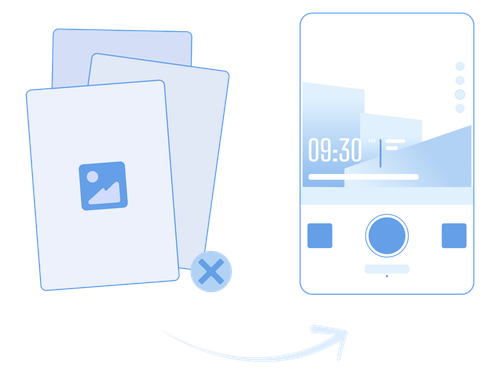
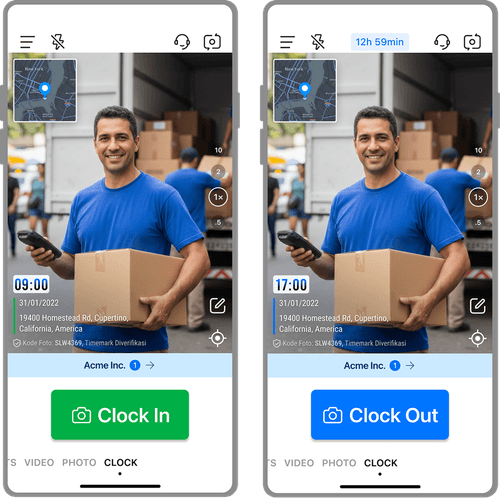
- Am Einsatzort aufgenommen: Fotos zur Zeiterfassung werden in der Timemark App aufgenommen und enthalten Datum, Uhrzeit, vollständige Adresse und eine Karte. Ein Foto kann nicht aus der Galerie des Telefons ausgewählt werden.
- Prüfung mit Foto-Code: Jeder kann den Foto-Code unter verify.timemark.com oder in der App prüfen. Er zeigt die ursprüngliche Zeit und den Ort, die auf dem Server erfasst wurden.
- Geschützte Zeit und Standort: Die Fotozeit kommt von der Netzwerkzeit, nicht von der Uhr des Telefons. Erkennt Timemark eine geänderte Geräteuhr oder einen simulierten GPS-Standort, wird kein Foto-Code erstellt. Das Foto besteht dann die Prüfung nicht.
Zeiterfassung für mehrere Einsatzorte
- Adresse bei jedem Stempeln: Jeder Stempelvorgang erfasst die Adresse, an der er erfolgt ist. Ein Tag an drei Einsatzorten erstellt drei Einträge mit drei Adressen.
- Ein Ort für das Team: Die Einträge aller Mitglieder landen in Teamspace unter Aktivität, Zeiterfassung, unabhängig von der Adresse.
- Ortszeit für jeden Mitarbeiter: Die Zeiten der Zeiterfassung werden in der Ortszeit jedes Mitglieds angezeigt. Das hilft, wenn Ihr Außendienstteam in verschiedenen Zeitzonen arbeitet.

Klare Stunden bei jedem Eintrag
- Vollständige Aufschlüsselung der Schicht: Das Foto beim Ausstempeln enthält die Zeit zum Einstempeln, die Zeit zum Ausstempeln, die Pausenzeit und die Arbeitszeit.
- Arbeitszeit berechnet: Die Arbeitszeit wird ohne Pausen berechnet. Sie kann nicht von Hand geändert werden.
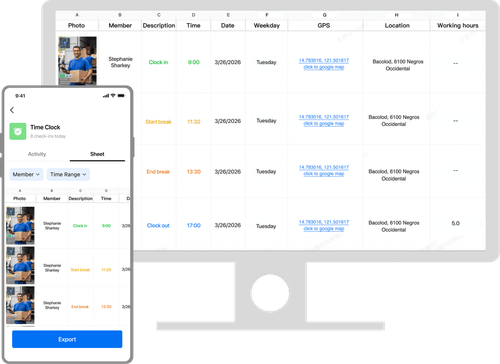
- Team-Summen: Das Team-Sheet summiert die Stunden nach Mitglied und Datum und exportiert sie dann nach Excel .xlsx.
Wie erfasse ich die Arbeitszeiten von Mitarbeitern im Außendienst?

1. Timemark holen
- Installieren Sie Timemark auf den Telefonen, die Ihr Team bereits nutzt.

2. Am Einsatzort einstempeln
- Jeder Mitarbeiter nimmt dort, wo er mit der Arbeit beginnt, ein Foto zum Einstempeln auf.

3. Pausen und ausstempeln
- Mitarbeiter erfassen Pausen und beenden die Schicht mit einem Foto zum Ausstempeln.

4. In Teamspace prüfen
- Sie prüfen die Zeiterfassungs-Einträge Ihres Teams in Teamspace, auch wenn Sie nicht vor Ort sind.
Für Teams außerhalb des Büros gemacht

Bauteams
- Bauteams brauchen Zeiterfassungs-Einträge, die zeigen, wer wann auf der Baustelle angekommen ist.

Außendienstservice
- Serviceteams im Außendienst brauchen einen Zeiterfassungs-Eintrag mit der Adresse jedes Kundenbesuchs.

Sicherheit und Streife
- Sicherheits- und Streifenteams brauchen Einträge, die zeigen, dass ein Mitarbeiter zu einer bestimmten Zeit an einem Ort war.

Außendienstvertrieb
- Vertriebsteams im Außendienst brauchen Zeiterfassungs-Einträge von den Orten, an denen ihr Arbeitstag stattfindet.
Zeiterfassungs‑Einträge, hinter denen Ihr Team stehen kann

Kein Einstempeln für andere
- Eine Person kann sich nicht für eine andere einstempeln, denn der Eintrag ist ein Foto einer Person an einem Ort zu einer Zeit. Ihr Vorgesetzter kann prüfen, wer erschienen ist.

Ein Teameintrag
- Führen Sie einen Satz Arbeitszeiten für das ganze Team, statt Screenshots zu sammeln und Zeiterfassungs-Einträge erneut einzugeben.

Dieselben Einträge für beide
- Ihr Team nutzt Telefone, während das Büro dieselben Einträge in Teamspace prüft. Es gibt keinen Export zwischen den Tools.
Ihr Team behält die Kontrolle über Zeiterfassungs-Einträge
Jeder Zeiteintrag wird mit Teamspace synchronisiert, wenn das Telefon online ist. Wer die Zeiterfassungs-Einträge sehen kann, richtet sich nach den Fotoberechtigungen Ihres Teams. Wurde ein Eintrag versehentlich erstellt, kann er von der Person, die ihn erstellt hat, oder in Teamspace entfernt werden. Das Löschen eines Fotos aus dem lokalen Album des Telefons entfernt nicht den synchronisierten Teameintrag.

Jeder kann Timemark-Fotos prüfen
Timemark nutzt die Netzwerkzeit. So zeigt das Foto die tatsächliche Zeit, auch wenn die Uhrzeit auf dem Telefon geändert wurde. Ein Foto-Code verknüpft das Foto mit der ursprünglichen Zeit, dem Standort und den Bildmerkmalen, die auf den Servern von Timemark gespeichert sind. Jeder kann ein Foto mit einem Code kostenlos auf verify.timemark.com oder mit „Fotos Überprüfen“ in der App prüfen.
- Das Foto zeigt die tatsächliche Zeit, auch wenn die Uhrzeit auf dem Telefon geändert wurde.
- Gefälschte GPS-Standorte werden als „Virtuelle Positionierung wird nicht gezeigt“ gekennzeichnet.
- Das Bearbeiten der Fotodatei oder der Metadaten ändert den gespeicherten Datensatz nicht.

Was Außendienstteams über Timemark sagen
“I'm a construction contractor, and Timemark changed how we handle field photos. Before, I spent 2 hours every night sorting photos from my team and trying to remember which shot went to which project. Now I have Timemark that auto-adds GPS stamps and organizes everything by project and member.”

“As a telecom contractor, we're always on different job sites, and tracking photos used to be a nightmare. My team would send photos via text or email, and half the time they'd miss location notes. With Timemark, every photo has a GPS stamp and timestamp.”
“Our team covers 20+ sites a day, and Timemark keeps us organized. Every inspection photo has exact time and place. Even new hires pick it up in 5 minutes. It’s reliable, simple, and the only tool we need to prove we did the work right.”
Häufig gestellte Fragen

Zeiterfassung im Außendienst leichter prüfen
Geben Sie Ihrem Team foto-verifizierte Zeiterfassungs-Einträge von jedem Einsatzort.
Kostenlos starten