
Verify Timemark Photos in Seconds
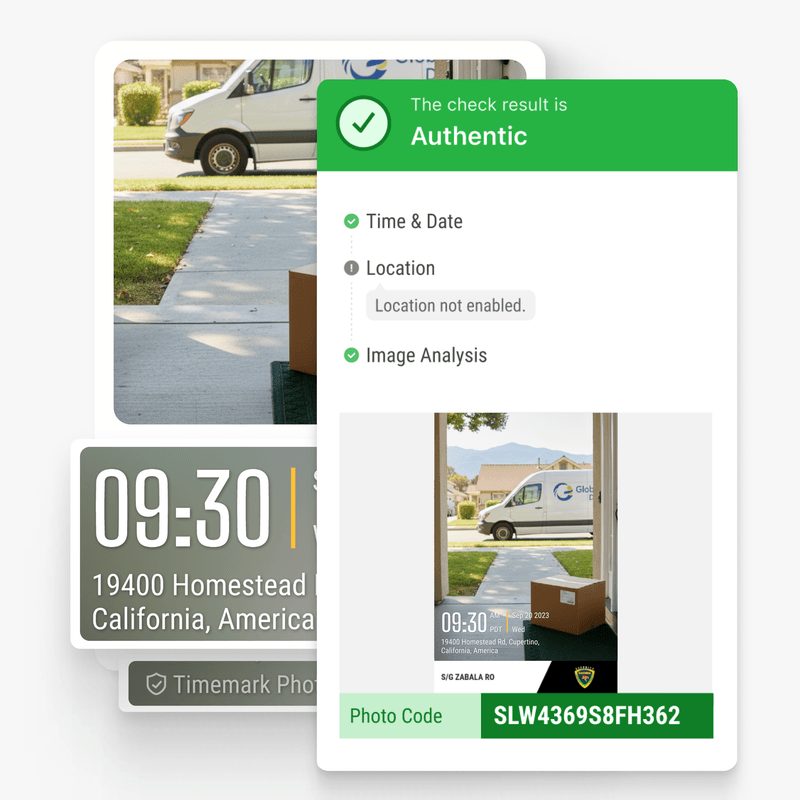
Photos with Timemark Photo Code are verified automatically. Time, GPS location, and notes are securely recorded, giving you trusted, tamper-proof photo records effortlessly.
Trusted by 3.7M field pros and teams from











Stop Wasting Time. Capture Accurate On‑Site Photos Instantly.
Are These Challenges Holding You Back?

Easy Tampering
- Time and location can be easily faked with normal phones.
- Digital edits or modifications may go unnoticed.
- Makes it hard to trust photos as real evidence.

No Verification
- Teams have no reliable way to verify when and where photos were taken.
- Manual checks are time-consuming and prone to human error.
- Photos lack a consistent, auditable verification method.

Unprofessional Photos
- Clients or regulators may question photo reliability.
- Without verified photos, errors are harder to detect.
- Leads to delays or disputes over project conditions.
How Timemark Photo Verification Works

1. Take the Photo
Timemark gets capture time from the network. If the phone clock was changed, Timemark detects it and corrects the time.
2. Check the Capture
Timemark flags mock GPS as "Virtual location detected". If it detects a modified app, the photo gets no valid Photo Code.
3. Create the Capture Record
A Photo Code links to the original time, location, and picture features stored on Timemark's servers. Offline photos still show real time, get a code, and can be verified later.
4. Check the Photo
Anyone can verify free by uploading the photo at verify.timemark.com or using "Verify Photos" in the app. It checks Time & Date, Location, and Image Analysis.
Teamspace control
Keep faked photos out of your Teamspace
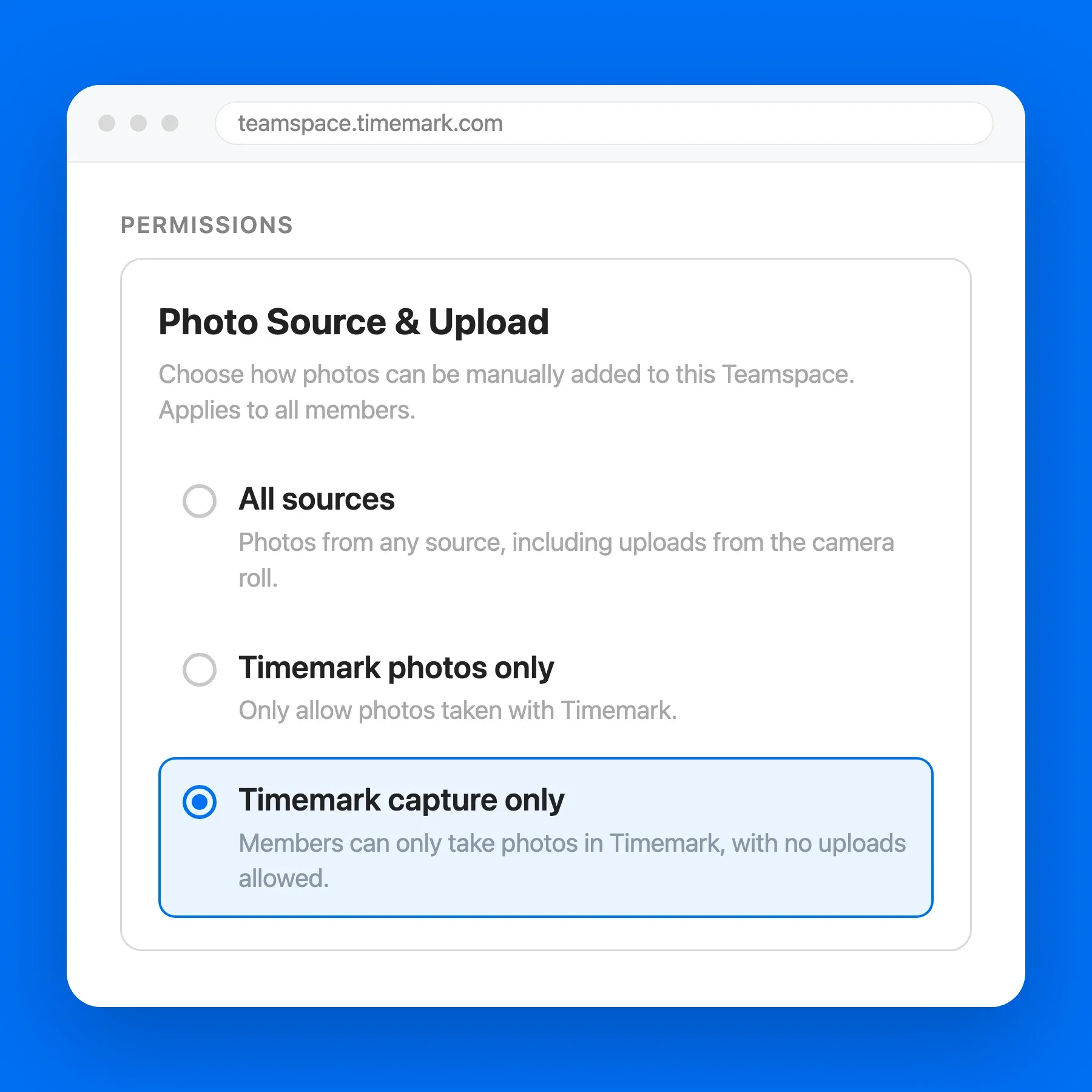
When your team uses Teamspace, the team owner can turn on “Timemark capture only”. It completely eliminates faked photos in that Teamspace, so no one needs to verify each photo.
- Only live photos taken in Timemark can enter Teamspace.
- Gallery, computer and other camera uploads are blocked.
- The owner sets it once, and it applies to every member.
Key Features of On‑Site Photo Capture
Photo Code Verification
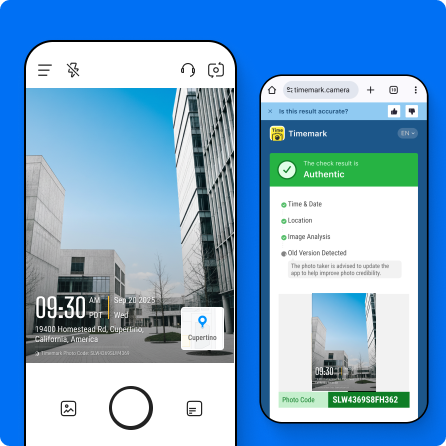
- Verify any photo with Timemark Photo Code enabled.
- Instantly check if a photo is original and verified.
- Helps prevent digital photo fraud.
Original Time & Location Check
- Compares the original capture time.
- Verifies the original location and GPS coordinates.
- Confirms the photo was taken when and where claimed.

Image Integrity Detection
- Checks the photo image itself for changes.
- Detects edits, replacements, or digital manipulation.
- Ensures every photo remains trustworthy proof.

Field-First Technology Built for Jobsite Teams
Timemark lets you quickly verify any photo that has a Photo Code. Each check compares the photo with the original time, GPS location and picture features recorded when it was taken, which helps reveal digital edits. Photos taken without a signal still show the real time and carry a Photo Code, and can be verified once the phone is back online.

What Verification Can and Cannot Show

What an Authentic Result Shows
- The photo was taken with Timemark at the recorded time and place.
- The time and address shown on the photo match the original record.
- No picture edits were found compared with features in the original record.

What Verification Cannot Show
- Whether the scene itself was real, such as whether a photo was staged.
- Whether a photo is authentic when its Photo Code was turned off, cropped out, or covered.
- Whether a court, insurer, or agency will accept the photo.
File Metadata, Phone Timestamps, and Timemark Compared
File Metadata (EXIF) | Phone Clock and GPS Stamp | Timemark | |
|---|---|---|---|
| Verification Features | |||
| Where Time Comes From | Phone clock | Phone clock | Network time |
| Time and Place Visible on Photo | |||
| Survives Sharing Through Chat Apps | Often removed | ||
| Unaffected by Phone Clock Changes | |||
| Flags Fake GPS Locations | |||
| Original Record Can Be Checked by Anyone | |||
| Can Flag Picture Edits | |||
Verify Timemark Photos by API and MCP
Timemark will support automatic verification of Timemark photos through an API and MCP. Access is by request. Contact support@timemark.com and tell us what you need.

Businesses and developers will be able to check Timemark photos automatically in their own system or workflow.

MCP Verification
MCP, or Model Context Protocol, will let AI assistants and AI agents check Timemark photos for your team.
What Field Teams Say About Timemark
“Timemark gives us a scalable way to collect tamper-proof, georeferenced field photos, improving transparency, auditability, and operational efficiency across our restoration projects.”

“Timemark streamlines how our field techs collect photos and eliminates the download process and email back-and-forth. And with all the context shown directly on the photos, they become much more usable for project managers and clients.”
“Timemark provides us with a scalable, cost-effective solution for managing photos across 100+ monthly projects and generating over 10 PDF reports each day.”
Frequently Asked Questions

Verify Jobsite Photos with Confidence
With Timemark, every photo is verified for time and location, ensuring authentic and trustworthy on-site records for every project.
Start For Free