
แอปลงเวลาพนักงานพร้อมการยืนยันด้วยรูปภาพ
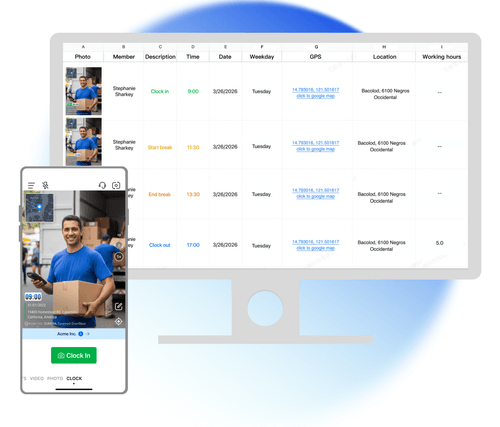
ทีมของคุณเช็คอินเข้างานและเช็คเอาต์เลิกงานด้วยรูปภาพที่มีเวลา ที่อยู่ และโค้ดรูปภาพ ไม่ต้องมีเครื่องลงเวลาแบบติดตั้งหรือคีออสก์ ข้อมูลจากทุกหน้างานซิงก์ไปยัง Teamspace
Trusted by 3.7M field pros and teams from











การลงเวลาหน้างานที่อาศัยความไว้ใจอาจมีปัญหา
เวลาบนรูปจากกล้องทั่วไปแก้ไขได้ ตำแหน่งไม่ได้ติดอยู่กับรูปภาพ และพนักงานคนหนึ่งอาจส่งรูปของอีกคนได้ บันทึกลงเวลาของ Timemark เป็นรูปที่ถ่าย ณ จุดนั้น พร้อมเวลา ที่อยู่ และโค้ดรูปภาพที่ตรวจสอบได้
คุณสมบัติหลัก
หลักฐานที่ตรวจสอบภายหลังได้
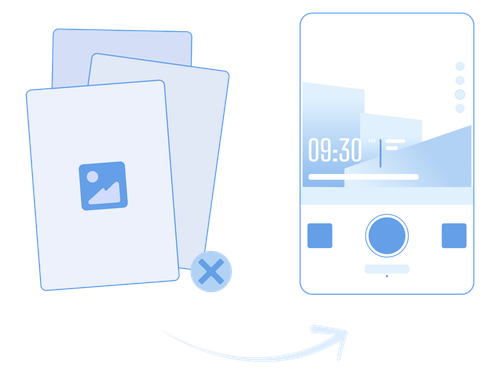
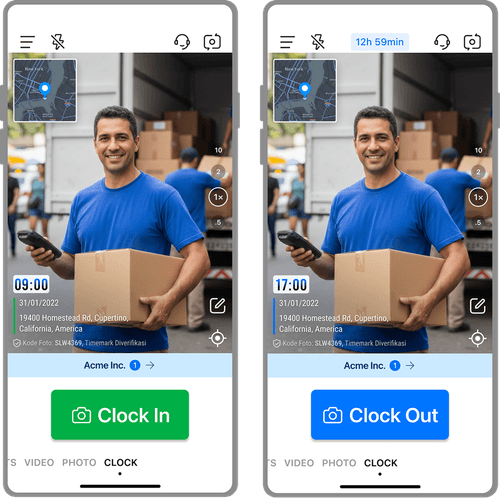
- ถ่ายที่หน้างาน: รูปลงเวลาถ่ายในแอป Timemark และมีวันที่ เวลา ที่อยู่เต็ม และแผนที่ ไม่สามารถเลือกรูปจากแกลเลอรีในโทรศัพท์ได้
- การตรวจสอบโค้ดรูปภาพ: ทุกคนตรวจสอบโค้ดรูปภาพได้ที่ verify.timemark.com หรือในแอป ระบบจะแสดงเวลาและตำแหน่งเดิมที่บันทึกไว้บนเซิร์ฟเวอร์
- ป้องกันเวลาและตำแหน่ง: เวลาของรูปมาจากเวลาเครือข่าย ไม่ใช่นาฬิกาในโทรศัพท์ หาก Timemark ตรวจพบว่ามีการเปลี่ยนนาฬิกาเครื่องหรือตำแหน่ง GPS ปลอม ระบบจะไม่ออกโค้ดรูปภาพ ทำให้รูปไม่ผ่านการตรวจสอบ
บันทึกการลงเวลาสำหรับหลายหน้างาน
- ที่อยู่ในทุกการลงเวลา: การลงเวลาแต่ละครั้งบันทึกที่อยู่ที่เกิดเหตุการณ์นั้น วันหนึ่งที่ทำงาน 3 หน้างาน จะมี 3 รายการพร้อม 3 ที่อยู่
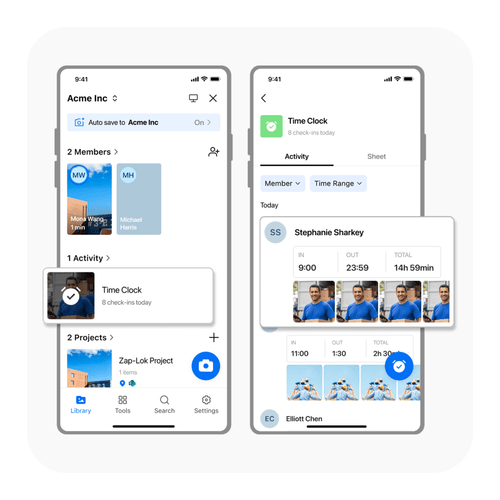
- ที่เดียวสำหรับทั้งทีม: ข้อมูลของสมาชิกทุกคนอยู่ใน Teamspace ภายใต้ รายการ, ลงเวลา ไม่ว่าพวกเขาจะอยู่ที่ใด
- เวลาท้องถิ่นของพนักงานแต่ละคน: เวลาเข้าออกงานแสดงตามเวลาท้องถิ่นของสมาชิกแต่ละคน ช่วยได้เมื่อทีมภาคสนามทำงานข้ามเขตเวลา
ชั่วโมงทำงานชัดเจนในทุกรายการ
- รายละเอียดกะงานครบถ้วน: รูปเช็คเอาต์เลิกงานมีเวลาเช็คอินเข้างาน เวลาเช็คเอาต์เลิกงาน เวลาพัก และเวลาทำงาน
- คำนวณเวลาทำงาน: เวลาทำงานคำนวณโดยหักเวลาพักออก ไม่สามารถแก้ไขด้วยมือได้
- ยอดรวมทีม: Sheet ของทีมรวมชั่วโมงตามสมาชิกและวันที่ แล้วส่งออกเป็น Excel .xlsx
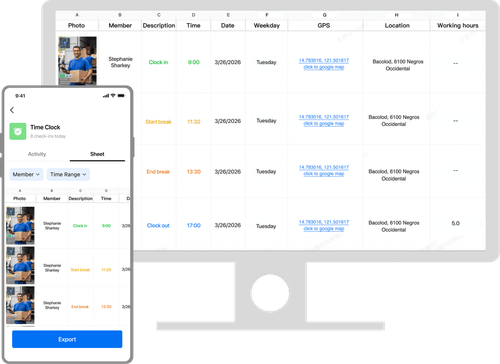
ติดตามการลงเวลาพนักงานภาคสนามอย่างไร

1. รับ Timemark
- ติดตั้ง Timemark ในโทรศัพท์ที่ทีมของคุณใช้อยู่แล้ว

2. เช็คอินเข้างานที่หน้างาน
- พนักงานแต่ละคนถ่ายรูปเช็คอินเข้างาน ณ จุดที่เริ่มทำงาน

3. พักและเช็คเอาต์เลิกงาน
- พนักงานบันทึกเวลาพักและจบกะงานด้วยรูปเช็คเอาต์เลิกงาน

4. ตรวจสอบใน Teamspace
- คุณตรวจสอบบันทึกการลงเวลาของทีมใน Teamspace ได้ แม้คุณไม่ได้อยู่หน้างาน
ออกแบบสำหรับทีมที่ทำงานนอกสำนักงาน

ทีมก่อสร้าง
- ทีมก่อสร้างต้องการบันทึกการลงเวลาที่แสดงว่าใครมาถึงหน้างานและเมื่อไร

บริการภาคสนาม
- ทีมบริการภาคสนามต้องการบันทึกการลงเวลาพร้อมที่อยู่ของการเข้าพบลูกค้าแต่ละครั้ง

รักษาความปลอดภัยและลาดตระเวน
- ทีมรักษาความปลอดภัยและลาดตระเวนต้องการบันทึกที่แสดงว่าพนักงานอยู่ ณ สถานที่หนึ่งในเวลาที่กำหนด

ขายภาคสนาม
- ทีมขายภาคสนามต้องการบันทึกการลงเวลาจากสถานที่ที่ทำงานในแต่ละวัน
บันทึกการลงเวลาที่ทีมของคุณยืนยันได้

ไม่มีการเช็คอินแทนกัน
- คนหนึ่งไม่สามารถเช็คอินเข้างานแทนอีกคนได้ เพราะบันทึกเป็นรูปของบุคคล ณ สถานที่และเวลาหนึ่ง ผู้จัดการของคุณตรวจสอบได้ว่าใครมาทำงาน

บันทึกเดียวสำหรับทั้งทีม
- เก็บชั่วโมงทำงานชุดเดียวสำหรับทั้งทีม แทนการรวบรวมภาพหน้าจอและพิมพ์บันทึกการลงเวลาใหม่

ข้อมูลชุดเดียวกันสำหรับทุกฝ่าย
- ทีมของคุณใช้โทรศัพท์ ขณะที่สำนักงานตรวจสอบข้อมูลชุดเดียวกันใน Teamspace ไม่ต้องส่งออกข้อมูลระหว่างเครื่องมือ
ทีมของคุณยังควบคุมบันทึกการลงเวลาได้
บันทึกลงเวลาแต่ละรายการซิงก์ไปยัง Teamspace เมื่อโทรศัพท์ออนไลน์ ผู้ที่ดูข้อมูลการลงเวลาได้จะเป็นไปตามสิทธิ์รูปภาพของทีม หากสร้างรายการโดยผิดพลาด ผู้สร้างรายการหรือลบใน Teamspace ได้ การลบรูปจากอัลบั้มในโทรศัพท์จะไม่ลบบันทึกทีมที่ซิงก์แล้ว

ทุกคนตรวจสอบรูปภาพ Timemark ได้
Timemark ใช้เวลาจากเครือข่าย จึงแสดงเวลาจริงบนรูปภาพแม้นาฬิกาในโทรศัพท์ถูกเปลี่ยน โค้ดรูปภาพเชื่อมรูปภาพกับเวลา สถานที่ และลักษณะของภาพต้นฉบับที่เก็บไว้บนเซิร์ฟเวอร์ของ Timemark ทุกคนตรวจสอบรูปภาพที่มีโค้ดได้ฟรีที่ verify.timemark.com หรือใช้ "ตรวจสอบรูปภาพ" ในแอป
- รูปภาพแสดงเวลาจริงแม้นาฬิกาในโทรศัพท์ถูกเปลี่ยน
- ตำแหน่ง GPS ปลอมจะแสดงว่า "ตำแหน่งเสมือนจะไม่ปรากฏ"
- การแก้ไขไฟล์รูปภาพหรือข้อมูลเมตาไม่เปลี่ยนบันทึกที่เก็บไว้

สิ่งที่ทีมภาคสนามพูดถึง Timemark
“I'm a construction contractor, and Timemark changed how we handle field photos. Before, I spent 2 hours every night sorting photos from my team and trying to remember which shot went to which project. Now I have Timemark that auto-adds GPS stamps and organizes everything by project and member.”

“As a telecom contractor, we're always on different job sites, and tracking photos used to be a nightmare. My team would send photos via text or email, and half the time they'd miss location notes. With Timemark, every photo has a GPS stamp and timestamp.”
“Our team covers 20+ sites a day, and Timemark keeps us organized. Every inspection photo has exact time and place. Even new hires pick it up in 5 minutes. It’s reliable, simple, and the only tool we need to prove we did the work right.”
คำถามที่พบบ่อย

ตรวจสอบการลงเวลาหน้างานได้ง่ายขึ้น
ให้ทีมของคุณมีบันทึกการลงเวลาที่ยืนยันด้วยรูปภาพจากทุกหน้างาน
เริ่มใช้ฟรี