
Review Jobsite Photos Like Spreadsheet
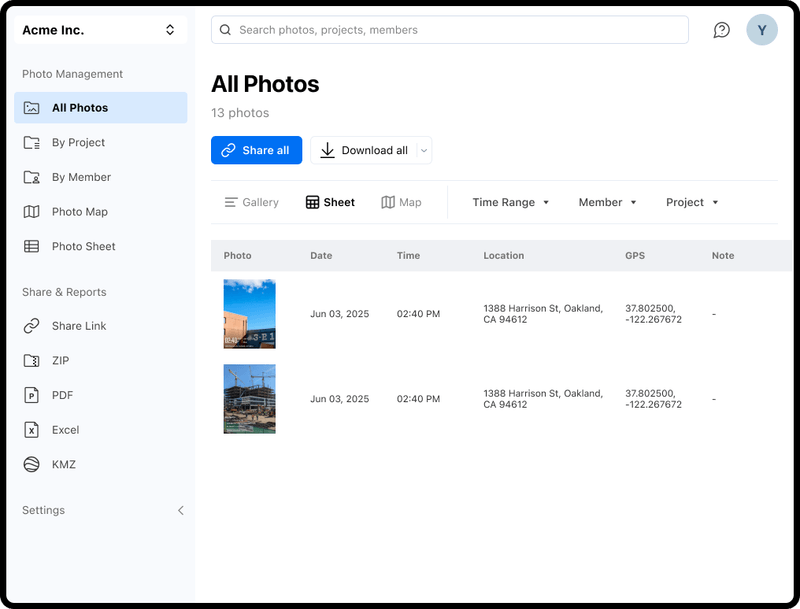
Turn thousands of jobsite photos into a clean, sortable photo table. Photo Sheet lets you review, filter, and export field photos in seconds — no more digging through folders.
Trusted by 3.7M field pros and teams from











Still Reviewing Photos One by One?
Are These Challenges Holding You Back?

Clicking Through Photos One by One
- Reviewing hundreds of jobsite photos one at a time in a folder view wastes hours every week.
No Easy Way to Filter
- Finding photos from a specific project, date, or team member means scrolling through everything manually.
Hard to Hand Off for Review
- Office and QA teams need a spreadsheet-style view to review work — raw photo folders don’t cut it.
How Photo Sheet by Timemark Can Help
View Online or Download
- View Online: View every jobsite photo directly in the browser without downloading.
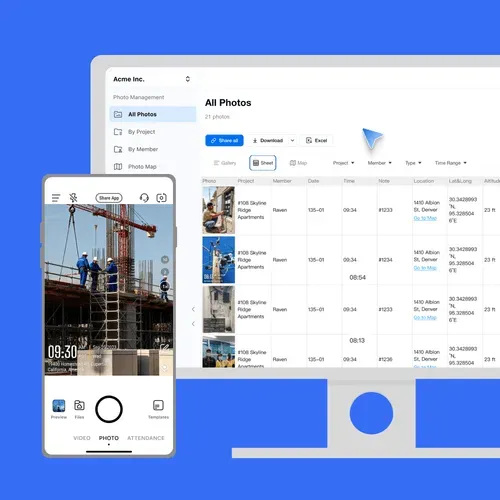
- Photo Details: See key photo details: time, location, member, and notes alongside each image.
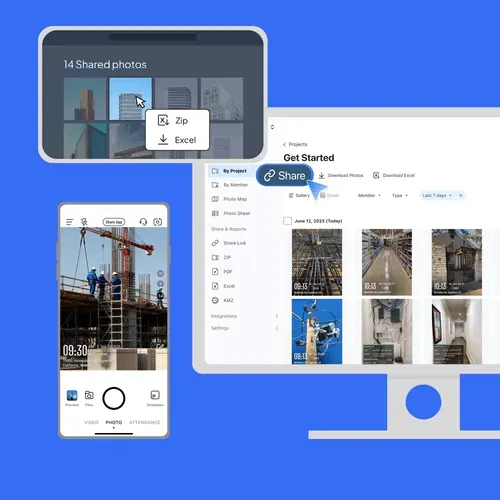
- Download Options: Download the entire Photo Sheet for offline review, or select individual photos to save separately.
- Team Efficiency: Keep your team efficient and organized with easy access to both images and information.
Sort, Filter, Share Photos Instantly
- Sort Photos: Quickly sort all job photos by project, member, type, or time for easy organization.
- Quick Filters: Easily find the photos you need by project, member, type, or time.
- Organized Photo Delivery: Deliver Clear and Readable photo sheet to clients
Built for Office Review & QA Teams

What Field Teams Say About Timemark
“Authenticity matters. Timemark lets us capture on-site photos with real time, location, and notes—making every image professional and trustworthy.”

“Timemark changes how we document medical and legal cases. Every photo captures real time, location, and on-site notes, making documentation fast, accurate, and professional.”
“One of the best apps for on-site photos. It captures the exact time and location, making documentation fast and professional.”
Frequently Asked Questions

Review Jobsite Photos the Smart Way
Photo Sheet gives you full visibility into your field photos — all in one sortable table.
Start For Free