Bg Shape

CompanyCam vs Timemark: The Best Jobsite Photo App for Proof of Work

Hesper Du

Image

    Timemark is rated 4.8+ on app stores and trusted by millions!

    Download Timemark
    Download Timemark APP

    If you're choosing between CompanyCam and Timemark for jobsite photo documentation, you're comparing two photo-first tools with very different approaches to pricing, verification, and team size.

    This page breaks down how they compare across the features that matter most to contractors and field teams. The goal is to help you make the right call without the guesswork.

    What Is CompanyCam?

    CompanyCam is a jobsite photo management app built for construction contractors. It lets teams capture, organize, and share job photos by project, with features like photo markup, annotations, and integrations with tools like Procore and JobNimbus.

    CompanyCam is best known for its clean interface and its strong ecosystem of integrations with larger construction management platforms. It's widely used by mid-to-large roofing, restoration, and general contracting teams.

    Best for: Teams already using Procore or other construction suites who want tight photo integration.

    What Is Timemark?

    Timemark is a photo-first field documentation tool trusted by 3.7M field professionals across construction, telecom, utilities, and inspection. It automatically stamps every photo with a verified timestamp, GPS location, and project notes. Everything syncs to a shared cloud workspace.

    Unlike CompanyCam, Timemark does not require a minimum number of seats, making it significantly more affordable for small teams. It also scales to enterprise deployments with thousands of users. It also offers tamper-proof photo verification and built-in AI features available even on the free trial.

    Best for: Teams of any size who need verified, GPS-tagged photo proof with AI-powered search and activity summaries. No overpaying for seats you do not use.

    CompanyCam vs Timemark

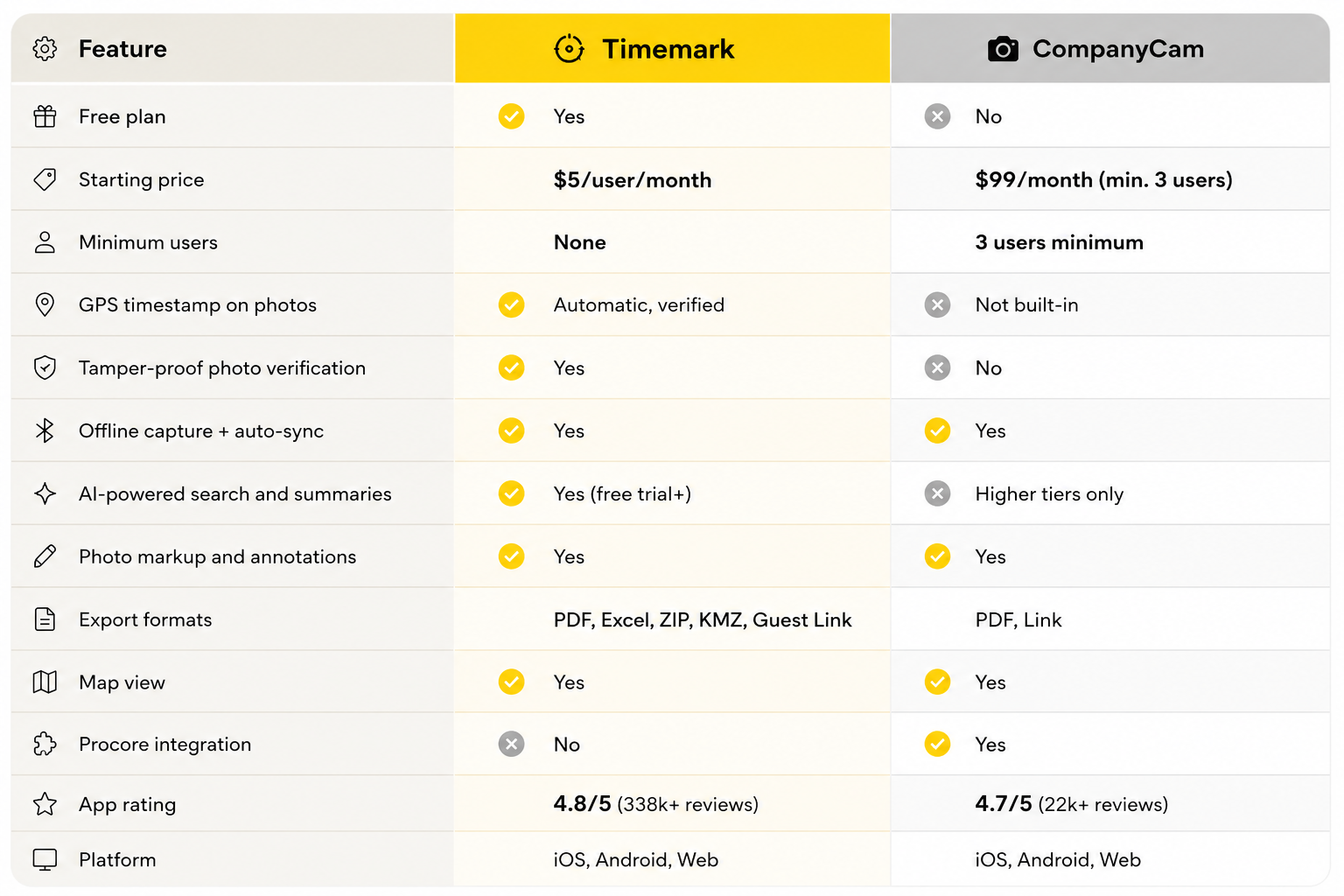
    Timemark VS CompanyCam Feature Comparison

    Where CompanyCam Wins

    Deep construction integrations: CompanyCam integrates natively with Procore, JobNimbus, AccuLynx, and other construction management platforms. If your team runs on one of these tools, CompanyCam slots in more naturally.

    Established ecosystem: CompanyCam has a longer track record with large GC and roofing firms, and a broader set of third-party integrations specifically built for the construction industry.

    Where Timemark Wins

    Verified, tamper-proof photo proof: Every Timemark photo is stamped with a cryptographically verified timestamp and GPS location. This makes photos legally defensible for disputes, change orders, and insurance claims. This is not something CompanyCam offers.

    AI features available from day one: Timemark's AI lets teams ask natural language questions like "Who hasn't taken photos this week?" or "Summarize this week's activity". These features are available even on the free trial and not locked behind a premium tier.

    Scales from 1 to thousands: Timemark works for solo contractors and enterprise teams alike. There is no minimum seat requirement and no cap on team size. Some Timemark teams have thousands of users across multiple projects simultaneously.

    No minimum seat requirement: CompanyCam starts at $99/month for a minimum of 3 users ($33/user). Timemark starts at $5/user/month with no minimum. A 2-person team saves over $120/month by switching.

    More export flexibility: Timemark exports to PDF, Excel, ZIP, and KMZ. CompanyCam only supports PDF and link sharing on most plans.

    Multilingual and international. Timemark supports teams in multiple languages, making it a natural fit for international operations and multilingual field crews.

    Which One Is Right for You?

    Choose Timemark if:

    • You want to avoid paying for a 3-seat minimum when you only need 1–2 users
    • You need GPS-verified, tamper-proof photo evidence for disputes, claims, or compliance
    • You want AI features (activity summaries, smart search, team tracking) available from the free trial. Not locked behind a premium plan
    • Your crew works in low-signal or remote areas and needs reliable offline capture
    • You want more export options (Excel, KMZ, ZIP) beyond PDF
    • You manage a large or enterprise team. Timemark scales to thousands of users with no seat cap
    • You work in telecom, utilities, inspection, field services, or surveying

    Choose CompanyCam if:

    • Your team already runs on Procore or another major construction platform and needs native integration
    • Deep construction-specific third-party integrations are a non-negotiable part of your workflow

    Bottom line: For most field teams, from solo contractors to enterprise operations, Timemark delivers more features at lower cost, with AI built in from day one. CompanyCam's main advantage is its Procore ecosystem.

    Real Teams, Real Results

    "CompanyCam forced 3 seats on us, even though it's just me and my helper. Timemark lets us pay per user and saves us $120/month. Plus, photos go straight to the right project folder."James Anderson, Contractor

    "A client said we damaged their wall. Timemark's photos had geotags and timestamps showing the damage was there before we arrived. We avoided a $2k claim."Amanda Robinson, Field Team Lead

    "We spent 3 hours a day organizing photos from texts. Timemark auto-collects and sorts by member and project. Now we have more time for on-site work."Casey Parker, Project Manager

    Frequently Asked Questions

    Is Timemark better than CompanyCam?

    For most teams, yes. Timemark offers verified GPS timestamps, AI-powered search and activity summaries available from the free trial, no minimum seat requirements, and more export formats. It also scales from solo contractors to enterprise teams with thousands of users. No seat cap applies. CompanyCam has an edge for teams already embedded in the Procore ecosystem. But for teams that want more features at lower cost without being locked into minimum seats, Timemark consistently comes out ahead.

    How does Timemark compare to CompanyCam on pricing?

    CompanyCam starts at $99/month for a minimum of 3 users, with additional users at $29/month each. Timemark starts at $5/user/month with no minimum seat requirement. A 2-person team using Timemark pays $10/month versus $99/month with CompanyCam. That is a saving of over $1,000 per year.

    Does Timemark have GPS timestamp like CompanyCam?

    Yes, and Timemark goes further. Every photo is automatically stamped with a verified GPS location and timestamp that is cryptographically tamper-proof. CompanyCam does not embed GPS timestamp directly onto photos or offer photo verification.

    Which app is better for small contractors, CompanyCam or Timemark?

    Timemark is generally the better fit for small contractors. There's no minimum seat requirement, setup takes minutes with no training, and the $5/user/month pricing scales naturally with small teams. CompanyCam's $99/month minimum can be hard to justify for teams of 1–2 people.

    Can Timemark replace CompanyCam?

    For most photo documentation workflows: capturing, organizing, reporting, and sharing jobsite photos. yes. Timemark covers all the core use cases, adds tamper-proof verification, AI-powered team insights, and scales to enterprise teams with no seat cap. The main scenario where CompanyCam is hard to replace is if your workflow depends specifically on its Procore or JobNimbus native integration.

    Does Timemark work offline?

    Yes. Timemark captures photos, GPS, and notes even without a signal. Everything syncs automatically to your team workspace once you're back online. This makes it particularly reliable for remote sites, underground work, and low-coverage areas.

    Try Timemark Free

    No credit card required. Set up your team workspace in minutes and start capturing verified jobsite photos today.

    Start for Free →

    About Timemark

    Timemark is a jobsite photo documentation app with timestamp, GPS geotag, and on-site notes. With Teamspace, field teams can automatically collect, organize, search, and export job photos across projects.

    Timemark empowers construction, field service, telecom, and transportation teams to capture verifiable job photos to prevent disputes, support claims, and ensure project transparency. Timemark makes job photos trusted, organized, report-ready, and searchable.

    Ready to Simplify Your Job Documentation?

    Say goodbye to manual photo uploads, messy email attachments, and lost photos. Keep your job photos organized.