
Can a Photo Timestamp Be Faked? How to Check the Real Date and Location
Elvis
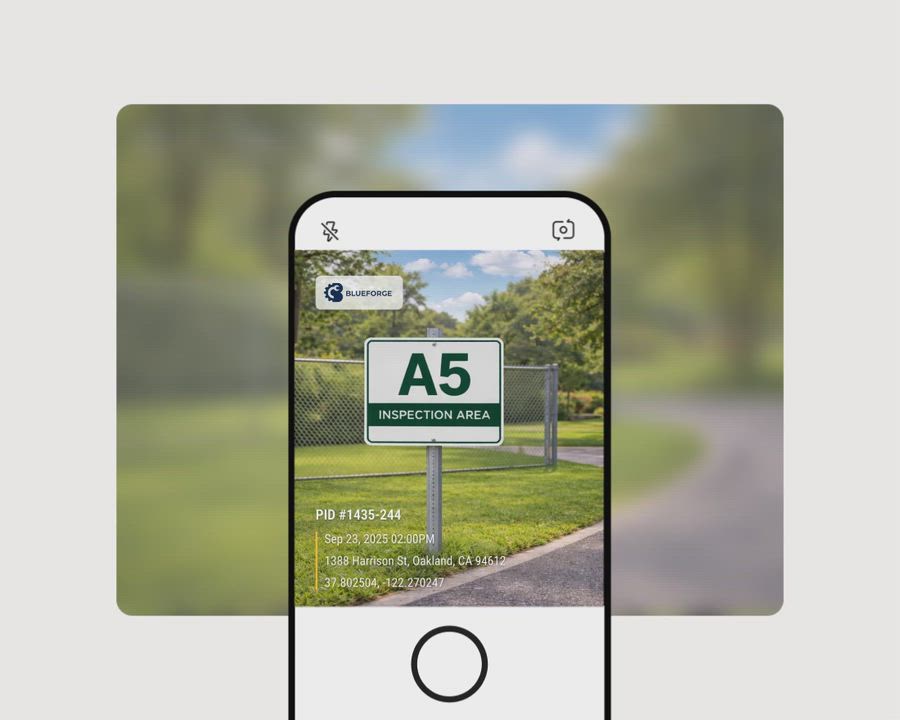
Yes. Both EXIF metadata and a timestamp printed on a photo can be changed or made wrong. A stronger time and place claim uses a record created outside the photo file at the moment of capture, with a way for someone else to check it later.
The three places a photo's date can live
When someone says a photo has a timestamp, they may be referring to one of three different things. They do not provide the same level of confidence.
1. EXIF metadata inside the file
Phones and digital cameras usually save the date, time, device details and sometimes GPS coordinates as EXIF metadata. This information is stored inside the image file.
EXIF is useful for organizing photos and making an initial check. But can EXIF data be faked, changed or edited? Yes. Free apps, desktop programs and websites can edit or remove it. Changing a phone's clock before taking a photo can also cause the wrong time to be written into EXIF from the start.
File dates shown by an operating system may be even less helpful. A created or modified date can change when a file is copied, downloaded or edited.
2. A timestamp printed on the image
Some camera apps print the date, address or GPS coordinates directly on the picture. This information remains visible even if EXIF is removed.
However, a visible stamp is not automatically proof. An ordinary timestamp camera usually reads the phone's clock and location. Changing the clock or using a mock-location app may produce a false stamp. Printed text can also be covered or edited like any other part of an image.
A strange-looking stamp can raise questions, but a natural-looking stamp does not prove that the information is correct.
3. An independent record made at capture
A stronger approach records the time, location and identifying picture information outside the photo file when the picture is taken. The photo also needs a reference that lets another person find and check that record.
Editing the photo's EXIF later should not change the separate record. The check should also be available to the recipient, not only to the person who took the photo.
Some newer cameras and phones offer Content Credentials, also known as C2PA, which provide a signed history that can be checked with a compatible viewer. Capture-time verification services are another approach.
How to check the date and location of a photo
Start by viewing the photo's available metadata. Keep the original file if possible. Screenshots, downloaded social media images and copies pasted into documents often contain less information.
On iPhone
Open the image in Photos. Swipe up or tap the information button marked i. You may see the capture date, time, camera details and a map if GPS data is present.
On Android
Open the image in Google Photos and swipe up. On some versions, open the menu and select Details. Look for the date, time, device and location.
On Windows
Right-click the image file and choose Properties, then Details. Look for fields such as Date taken, camera model, latitude and longitude.
On Mac
Open the image in Preview. Select Tools, then Show Inspector. Open the information tab and review the EXIF and GPS sections.
For a JPEG with GPS metadata, you can also use Timemark's free Find Location From Image tool.
Finding a date or map location tells you what the file says. It does not establish that the data is original or correct. Missing metadata also does not prove deception. It may have been removed during normal sharing or processing.
WhatsApp usually removes photo metadata when an image is sent as a photo. Sending it as a document can preserve the original file and its metadata. Other messaging and social platforms may also strip or rewrite metadata.
Signs that a photo timestamp may be wrong
There is no single visual test that reliably detects a fake timestamp. Instead, compare several clues:
- The date conflicts with the weather, season, daylight or shadows.
- The claimed time does not fit visible clocks, signs or scheduled events.
- The location conflicts with landmarks, road signs or the scene.
- The file has no metadata when an untouched original should be available.
- EXIF dates disagree with each other or with the visible stamp.
- The stamp's font, spacing, edges or position look inconsistent.
- The sender provides only a screenshot or edited copy instead of the original file.
Treat these as reasons to ask questions, not as proof of fakery. Compression, editing, time zone changes and normal app behavior can also create inconsistencies.
How to prove when a photo was taken
If you need to prove your own photo's time and place, plan the capture process before taking it. You cannot create a strong capture-time record afterward.
A practical workflow should:
- Record the time and location when the camera is used.
- Detect common attempts to manipulate the phone's clock or location.
- Keep a separate record that is not changed when EXIF is edited.
- Give the recipient a simple way to check the photo.
- Preserve the original file whenever possible.
For recurring work, agree on the process in advance. Property managers, insurers, contractors and field crew managers can tell photographers which app to use, what must appear in the frame and how files should be delivered.
How Timemark creates photos that can be checked later
Timemark is a free camera app for iPhone and Android. It prints the time, address, GPS coordinates and optional notes on a photo as it is taken. It cannot add a Timemark stamp to an old photo.
Timemark gets the time from the network. If the phone clock has been changed, the app detects it and corrects the time used on the photo so the photo shows the real time rather than the altered system time.
On both iPhone and Android, Timemark also detects a mock GPS location. When that happens, the address printed on the photo says Virtual location detected.
A Timemark photo with a valid Photo Code has that code printed on the image. The code connects to the original time, location and picture features recorded at capture and kept on Timemark's servers. Editing the image file or its EXIF does not change that separate record.
If Timemark detects a modified app, or cannot confirm the device is safe after a long period offline, the photo receives no valid Photo Code. Normal offline photos can still show the real time and carry a Photo Code. They can be verified after the phone reconnects.
You can read more about how Timemark photo verification works.
How to verify a Timemark photo
Anyone can check a supported photo for free without installing the app:
- Go to verify.timemark.com, or select Verify Photos at the top of the Timemark app.
- Upload the photo containing its visible Photo Code.
- Review the checks for Time & Date, Location and Image Analysis.
- Read the result: Authentic, Fake, Unable to Verify or Not Found.
Image Analysis compares the uploaded picture with features recorded at capture. It is designed to tolerate normal compression, which is common when photos are shared.
What photo verification cannot prove
Time and location verification does not prove that the scene itself is genuine. Someone could stage a scene, photograph another screen or place an object in view.
Timemark also cannot verify a photo without a Photo Code. The code can be disabled in settings, cropped out or covered. Finally, whether a court, insurer, agency or other organization accepts any photo is that organization's decision.
Frequently asked questions
Can someone tell if you change the timestamp on a photo?
Not always. An examiner may notice conflicting metadata or editing signs, but EXIF alone usually cannot provide a reliable history of every change. If the original claim was recorded by an external capture-time service, the recipient can compare the file with that record.
Is it possible to change a timestamp on a photo?
Yes. EXIF timestamps can be changed with common editing tools. The visible date printed on an image can also be edited, and changing the phone clock before capture may create a wrong timestamp from the start.
Can someone see the original date on a photo I send them?
Sometimes. If you send the original file and the receiving app preserves EXIF, the recipient may see its stored capture date. If the app strips metadata, they may see only the download or file date. Even preserved EXIF is not proof that the date was never changed.
Does WhatsApp remove photo metadata?
WhatsApp usually removes metadata when a picture is sent as a photo. Sending the file as a document can preserve it. This behavior can vary by file type, device and app version, so check the received file rather than assuming the metadata survived.
How do I check a timestamp on a photo?
Open the photo's information or details view on your phone or computer and inspect its EXIF date. Then compare it with visible scene details and any printed stamp. If the photo has a verification code or Content Credentials, use the relevant viewer to check the separate capture record.
How can I verify the authenticity of a photo?
For time and place, look for a capture-time record that exists outside the image and can be checked by the recipient. Metadata and visual inspection are useful clues, but they do not establish that the scene itself was truthful or unstaged.
How do I check a photo's date and location after metadata was removed?
You generally cannot recover deleted EXIF from the shared copy. Ask for the original file or use a capture-time verification record if one was created. Without either, you may be limited to visible clues and information supplied by the sender.