
Timemark Explained: A Beginner’s Guide to Verified Jobsite Photos
Gloria · Mar 10, 2026
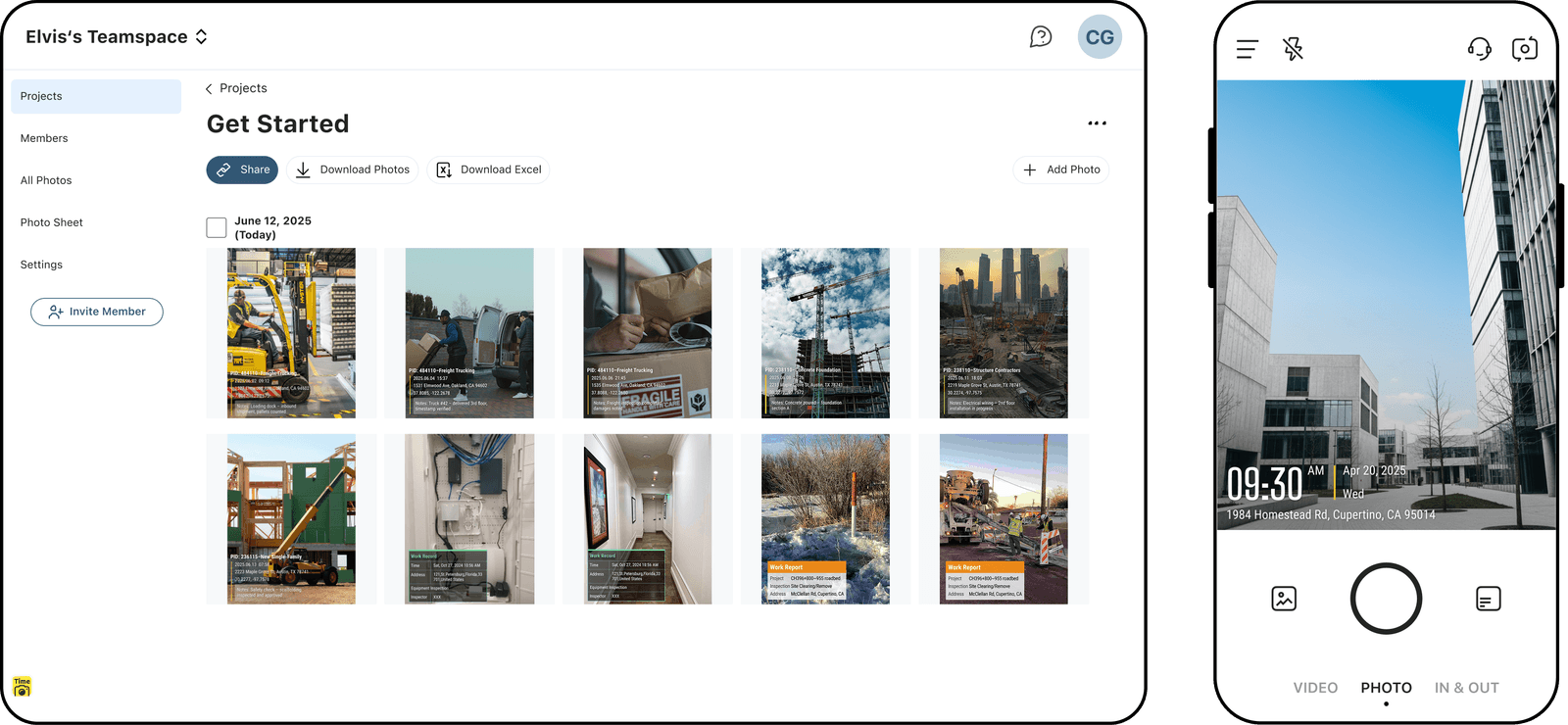
If you've ever taken a photo for work and later couldn't remember exactly where or when it was taken, you're not alone. Many jobsite photos end up scattered across phones, chat apps, and email threads. When someone asks for proof, it can take a long time to find the right photo, or the details may not be clear anymore.
Welcome to your Beginner's Guide to Timemark. You'll learn what Timemark does and how to use it to capture organized, verifiable job photos.
What is Timemark?
Timemark Camera is a professional photo documentation app built for field work. It helps you capture real time, real location, and job details on every photo.
Then it helps you organize, verify, and report those photos in one place.
If your photos are connected to payments, inspections, claims, compliance, or project tracking, then your photos are not just pictures. They are records.
Timemark makes those records structured, searchable, and trustworthy. Timemark is commonly used in construction, telecom, field service, inspections, and security.
Core Features of Timemark
Let's walk through the main features one by one.
1. Full Metadata Watermark
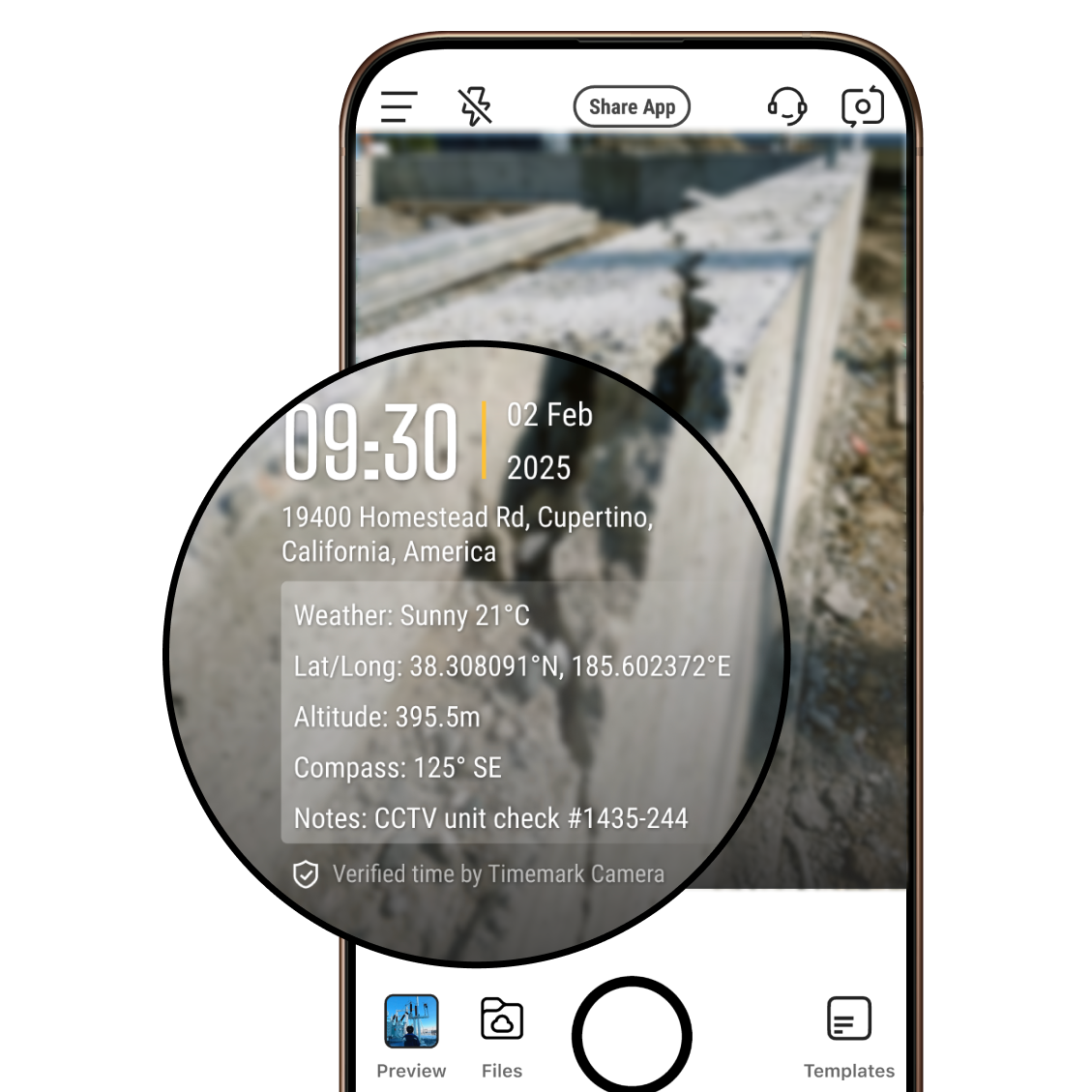
When you take a photo inside Timemark, the app can stamp complete job details directly onto the image.
This includes the date, exact time, GPS location, address, map view, latitude and longitude, elevation, weather, custom notes, and your company logo.
Instead of having hidden metadata stored in the background, the important information is visible on the photo itself. That means the context travels with the image wherever it goes. A simple photo becomes a complete job record.
2. Photo Verification

Timemark is not just about showing data. It is about proving it.
Each photo comes with a unique photo code. That code can be entered into the Verification Center to confirm that the photo is authentic and that its time and location have not been altered. This matters when someone questions your work. Instead of arguing, you verify.
3. Cloud Workspace (Teamspace)
Teamspace is Timemark's cloud workspace. If you work alone, Teamspace helps you stay organized. If you work with a team, it becomes much more powerful.
Automatic photo collection. Photos taken by team members are automatically uploaded and collected in Teamspace. Managers no longer need to chase photos through chat apps, email, or personal phones.
Organized by project and crew. All photos are automatically grouped by project and crew. This makes it easy to track job progress and find records later.
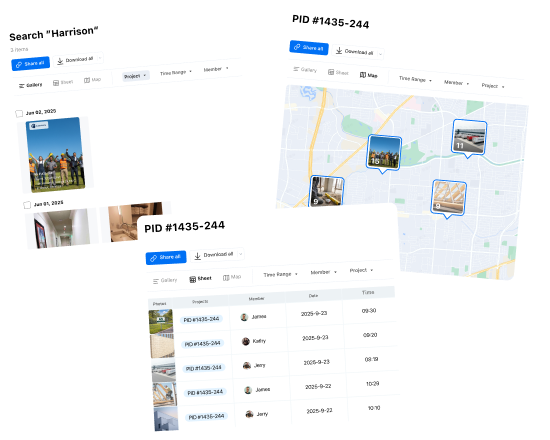
Multiple ways to view photos. You can view documentation in different formats depending on what you need. Photos can be displayed in a map view, sheet view, or gallery view, which makes it easier to review locations, scan data, or browse images.
Save photos to Teamspace only. If you want to save storage on your phone, you can choose to store photos directly in Teamspace without saving them locally on the device.
Instead of photos scattered across phones, chat apps, and email threads, everything lives in one structured system. Managers can log in from anywhere, monitor job progress, control access, and keep long-term records organized.
4. Reporting Tools
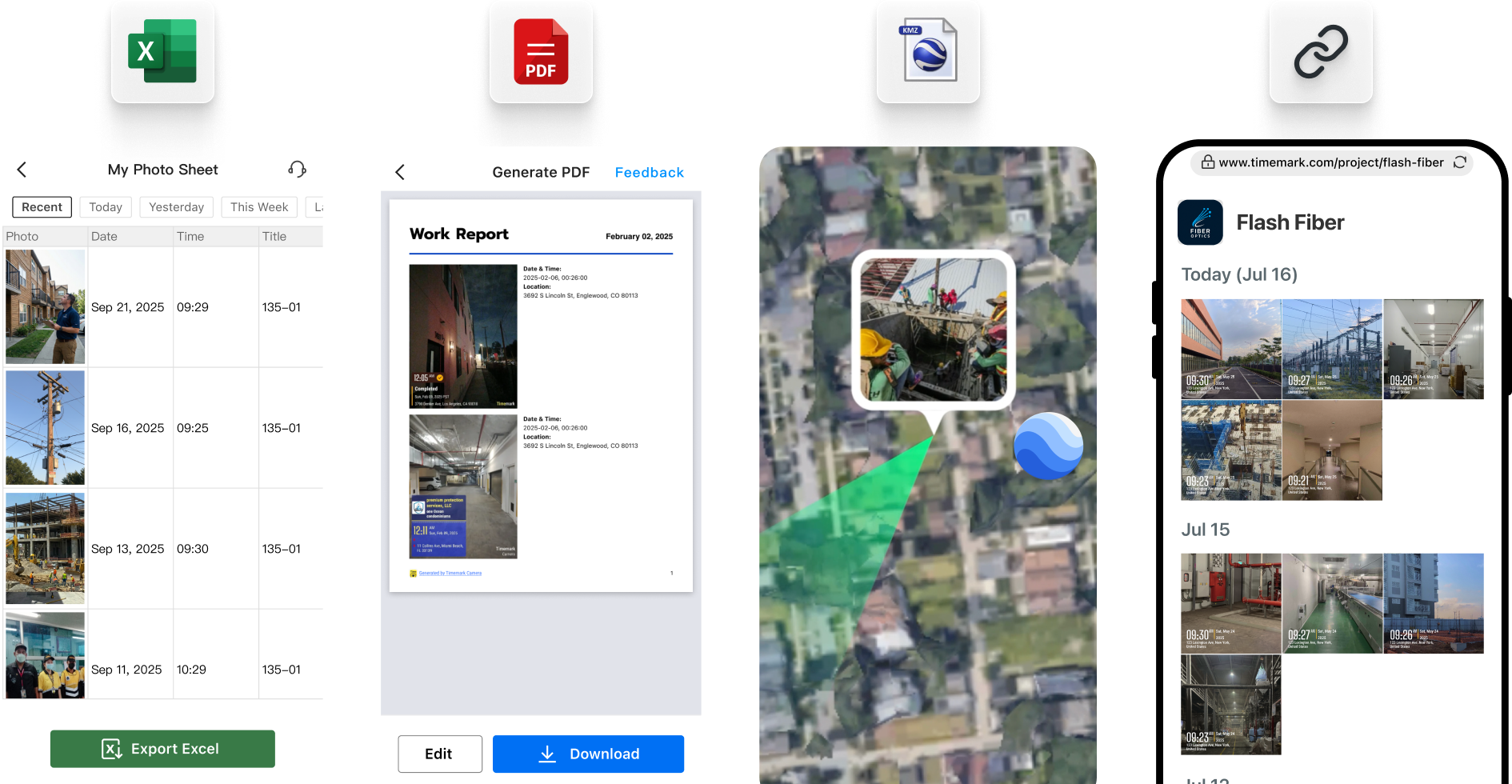
Timemark makes it easy to turn photos into clean, professional reports.
Instead of sending dozens of loose images, you can generate organized PDF reports that clearly show the timeline and job details. This saves time and reduces back-and-forth communication with clients or supervisors.
Timemark also supports exporting in other formats such as Excel, ZIP, and KMZ files for map viewing. You can also share photos through a guest link, which allows others to view documentation without needing a Timemark account.
This makes it easier to share job records, submit reports, or keep long-term project documentation organized.
5. User Permissions
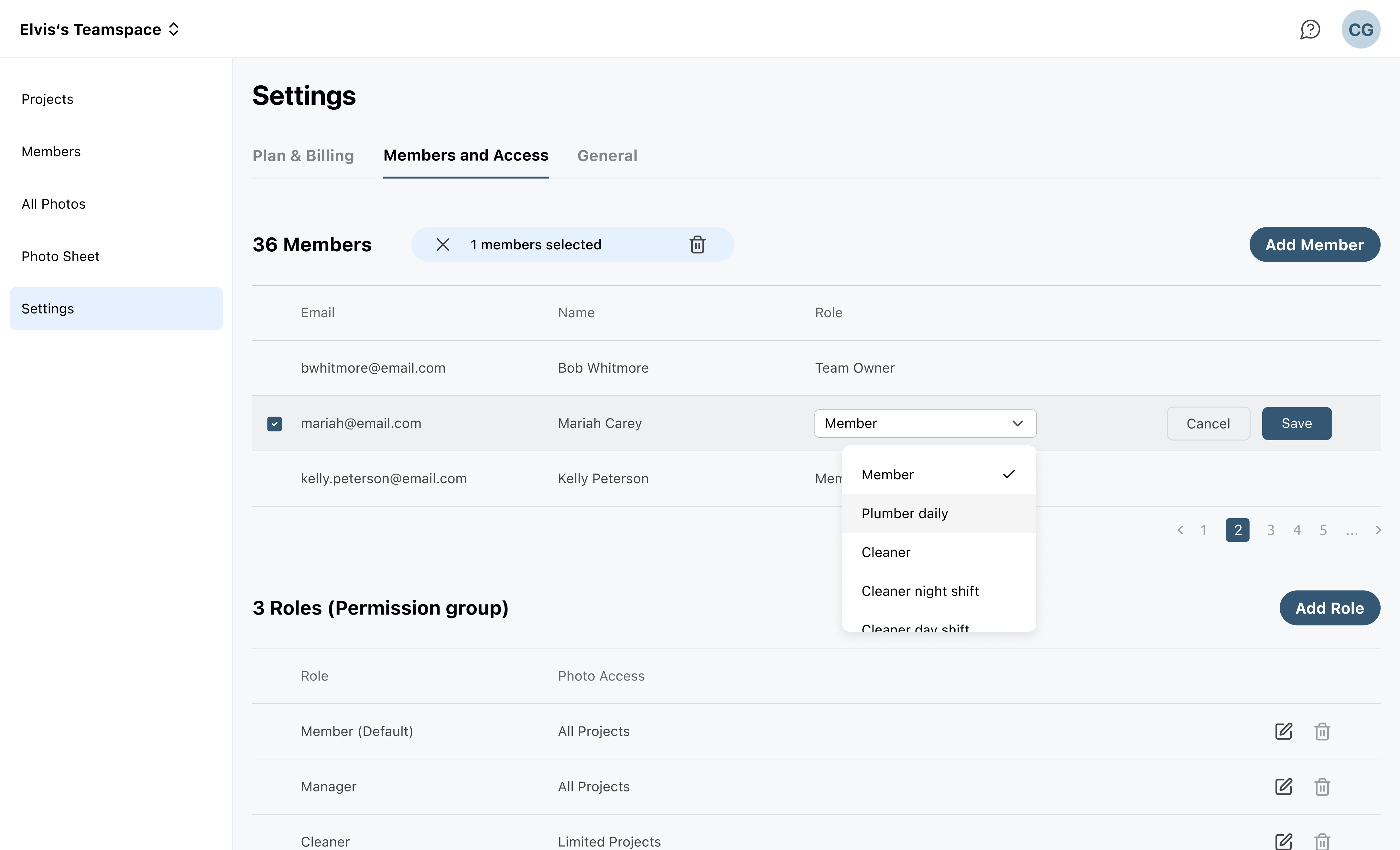
You are in control of who sees what. Timemark allows you to assign roles and manage permissions. You can decide who can delete photos, who can edit folders, and who can just view them and has access to which projects. It keeps your data safe and organized.
This keeps your workflow secure and organized, especially as your team grows.
6. Time Tracking
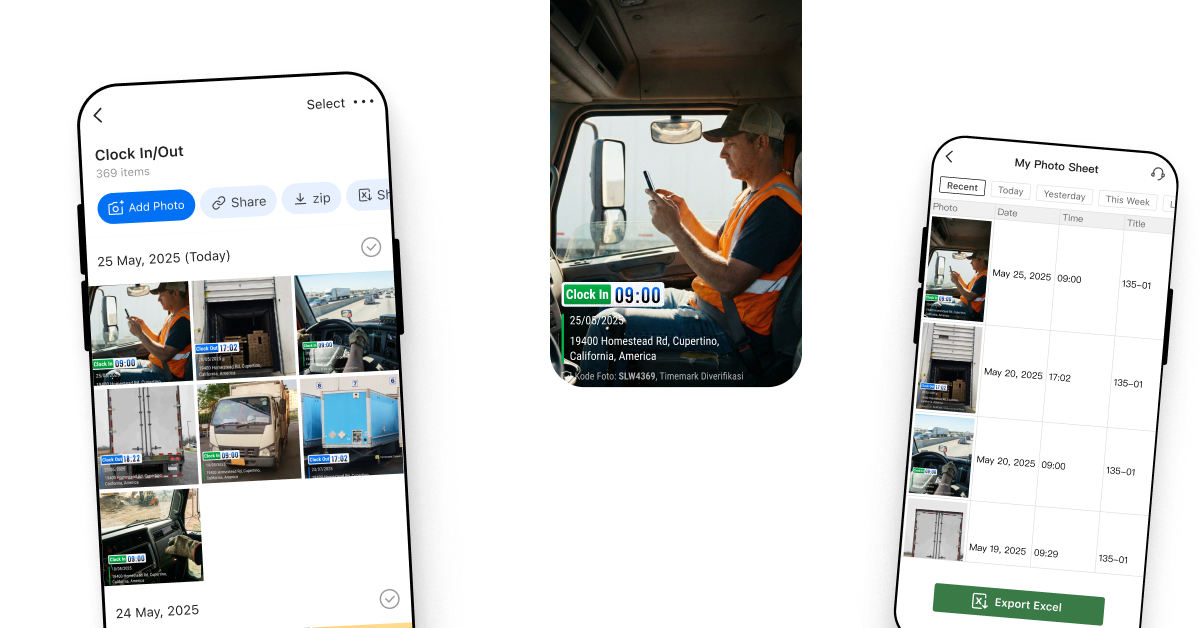
Timemark also works as a time tracking system. Workers can clock in and clock out by taking timestamped photos. Each photo records the real time and real location, creating a clear attendance record for the day.
Timemark can automatically turn those records into timesheets, which makes payroll easier and reduces confusion about hours worked.
When used together with Teamspace, clock-in photos from different workers are automatically collected in one place. Managers can review attendance, check work hours, and keep organized records without chasing photos from employees.
7. Integrations
Timemark is designed to fit into your workflow. It integrates with tools like OneDrive, Google Drive, and SharePoint, allowing teams to store and manage documentation in the systems they already use.
Timemark also supports webhook, so job photos and data can flow into other software automatically. This helps connect Timemark with reporting systems, project tools, or internal dashboards.
Instead of replacing your current tools, Timemark strengthens the documentation layer inside your workflow.

Why Should You Use Timemark?
You might be thinking, "Why can't I just use my phone's normal camera?"
A normal camera can take photos, but it doesn't organize them or clearly prove when and where work happened. Job photos often get mixed with personal pictures, and important details can easily be lost.
Timemark solves this by turning simple photos into clear job records. Each photo shows the time, location, and other job details directly on the image. Work photos are also organized by project and automatically collected for the team, so managers don't have to chase photos across phones or chat apps.
Compared with other jobsite photo apps like CompanyCam, Timemark focuses on complete jobsite documentation and evidence-grade photo records. It prioritizes verifiable authenticity, simple workflows, and scalable pricing, without unnecessary features.
How to Get Started with Timemark
For Users Who Need Cloud Storage and Team Collaboration
If you want to organize job photos, manage projects, and work with a team, you can use Teamspace, Timemark's cloud workspace.
- Download and sign up: Get the Timemark app from the App Store or Google Play. Create an account using your email.
- Create a project and bring your team: Inside the app, create your first project. You can invite team members so their photos are automatically collected into the same workspace.
- Choose a template and start capturing: Pick a metadata template that fits your workflow. Then start taking photos on-site. Timemark automatically stamps the time, location, and other job details.
- View, organize, and share: Photos are uploaded to the cloud and organized by project. You can review job progress, generate reports, export files, or share documentation with clients.
For Users Who Only Want Timestamped Photos
Some users simply need a reliable timestamp camera. In that case, the workflow is very simple.
- Download and open the app: Install Timemark from the App Store or Google Play, then open the camera inside the app.
- Take photos with metadata: Snap photos directly in Timemark. The app automatically stamps the time, location, and other job details on the image.
- Save or export your photos: You can save the photos to your phone or export them to ZIP, Excel, PDF, or KMZ when needed.
- Verify if necessary: Each photo also includes a unique photo code, which can be used to verify the authenticity of the image if required.
About Timemark
Timemark is a jobsite photo documentation app with timestamp, GPS geotag, and on-site notes. With Teamspace, field teams can automatically collect, organize, search, and export job photos across projects.
Timemark empowers construction, field service, telecom, and transportation teams to capture verifiable job photos to prevent disputes, support claims, and ensure project transparency. Timemark makes job photos trusted, organized, report-ready, and searchable. For setup instructions and product guidance, visit the Timemark Help Center.