
Your Solar Photos Are Probably Not PTO Ready
Hesper Du · May 13, 2026
Most solar installers know to take photos on the job. What most don't realize is that the photos they're taking may not be enough.
Here's why: in the United States, for many residential solar installations, photo documentation paired with a signed electrical permit is sufficient for utility interconnection approval. Your photos replace a physical inspection. The utility reviews them to determine whether your system is safe to connect to the grid. If photos are missing, unclear, or out of sequence, the answer is no. The system stays off. The customer can't generate power. And your team makes another trip to the job site.
Even minor errors or missing items can stall Permission to Operate (PTO) approval, and incomplete photo documentation is one of the most common reasons it happens.
What Solar Teams Are Required to Document
Most installers treat photos as a final step: a few quick shots before packing up and leaving. The problem is that once panels are mounted and wiring is concealed, there is no opportunity to document what's underneath. The sequence matters as much as the content.
Based on industry standards and utility requirements, here is what needs to be documented at each stage:
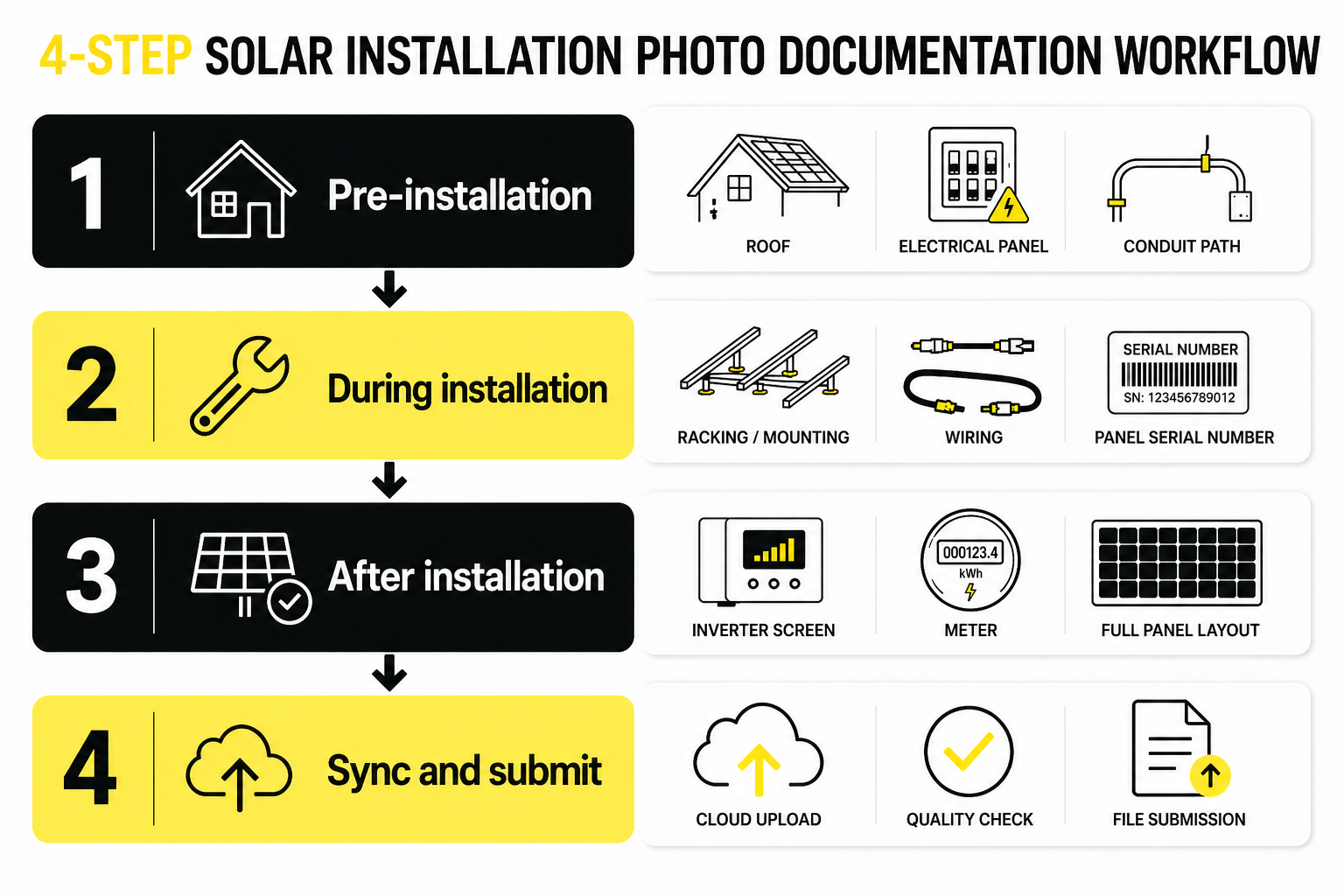
At minimum: roof photos showing material, condition, and all existing penetrations; a complete set of electrical photos covering the main service panel interior, meter socket, existing breakers, and busbar labels; and photos of the conduit path from the planned inverter location to the main panel.
Pre-installation photos serve two purposes. They form part of the permit package, and they establish a record of the site's original condition, protecting the installer if a homeowner later claims the work caused damage.
- Racking and mounting hardware
- Wiring and conduit routing before
- concealmentGrounding connections
- Serial number of each panel
Required photos include: racking, panels, inverter, and the generation meter with serial number, make, model, and reading. Additional photos needed: the inverter display showing the system is live, all disconnect locations, a full panel layout from ground level, and the final electrical panel with the solar breaker labeled.
The Gap Nobody Talks About
What Happens During a Dispute
That is when documentation stops being “photos” and becomes evidence.
Teams quickly realize:
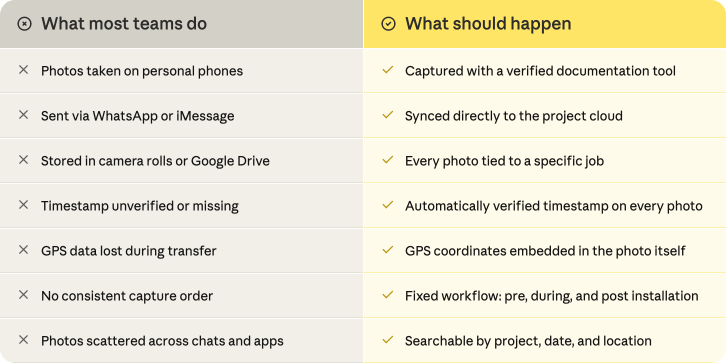
- No timestamp means no clear timeline.
- No GPS data means no verified jobsite.
- Scattered photos mean no reliable record.
- No structure means no proof of work.
A collection of random images is not documentation. It is just photos.
The Cost of Getting It Wrong
Incomplete photo documentation is not just an inconvenience. It carries a direct financial cost. According to a 2025 survey by SiteCapture and Solar Power World, 60% of solar installers send a team back to the job site at least once per project just to collect missing photos. The average cost per return trip is $475. For a company running 60 residential projects per year, that adds up to more than $17,000 in avoidable losses annually.
Installers in this situation are not cutting corners. They simply do not have a consistent documentation process in place. The solution is not working harder on site. It is having a checklist that ensures nothing is missed before the crew leaves.
The Correct Documentation Workflow
Based on DOE requirements and industry standards, every solar installation should produce the following:
↓
↓
↓
This is where many documentation processes break down. Photos are often stored across personal phones, messaging apps, and shared drives, making them difficult to verify or retrieve later.

Standards Are Rising
Teams that avoid these problems treat photos differently. They do not see them as pictures. They treat them as work records. That means every photo must be tied to a specific job, automatically timestamped, location verified, consistently structured, and easy to retrieve later.
Final Thought
Solar installation is not just about completing the work. It is about being able to prove the work was done.
Most solar teams are not failing to take photos. They are failing to turn those photos into something reliable. That gap only becomes visible when something goes wrong.
About Timemark
Timemark is a jobsite photo documentation app with timestamp, GPS geotag, and on-site notes. With Teamspace, field teams can automatically collect, organize, search, and export job photos across projects.
Timemark empowers construction, field service, telecom, and transportation teams to capture verifiable job photos to prevent disputes, support claims, and ensure project transparency. Timemark makes job photos trusted, organized, report-ready, and searchable. For setup instructions and product guidance, visit the Timemark Help Center.