
Why Timemark is the best CompanyCam Alternative
Jane Zhang · Nov 21, 2025
Many teams use CompanyCam for work in construction, engineering, and field service. They use it to take photos on the job site. They also use it to track progress. It helps everyone understand the same information. It supports daily work, like noting problems and sharing updates with clients.
But now there is a better alternative: Timemark. It has smarter features and costs less.
Why Does CompanyCam Bother?
- CompanyCam’s Authenticity Challenges CompanyCam does not have strong anti-tampering or compliance protection. This is a big problem for teams that need photos that are accurate and easy to verify.
- CompanyCam’s Cost Structure High Subscription & Scaling Costs: The basic plan costs money. Adding more users makes the price go up fast. Project Expansion Pressure: Using CompanyCam for many projects can put extra stress on a small business’s budget.
- CompanyCam’s Complex Interface Users often find CompanyCam’s interface confusing. This can make daily tasks slower and harder to do.
- CompanyCam’s Missing or Overcomplicated Features: Some important features are missing or too complicated. This makes workflows harder and lowers productivity.
Timemark's Core Value Proposition
In fast construction and field work, taking accurate photos on site is very important. Teams need tools that are reliable and easy to use. These tools help document work without slowing down the workflow. This is where Timemark stands out.
- Focus on Authenticity and Efficiency Timemark has one main goal: make sure every on-site photo is real. It also keeps field work fast and smooth. Unlike other tools, it focuses on photo accuracy and easy workflow. This gives teams confidence in every photo they take.
- Tailored for Field Professionals Timemark is for you. Whether you are a contractor, roofer, insurance adjuster, or field service worker. Its tools fit into daily work easily. You can capture, share, and manage job-site photos without extra hassle.
- Simplicity in the Field, Complexity in the Backend Timemark keeps the field experience simple. Teams can focus on work, not technology. All the complex features—like analytics, verification, and reporting—work in the background. Managers get the control they need. Field work keeps running fast without delays.
Key Areas Where Timemark is CompanyCam's Best Alternative
1. Unrivaled Photo Integrity
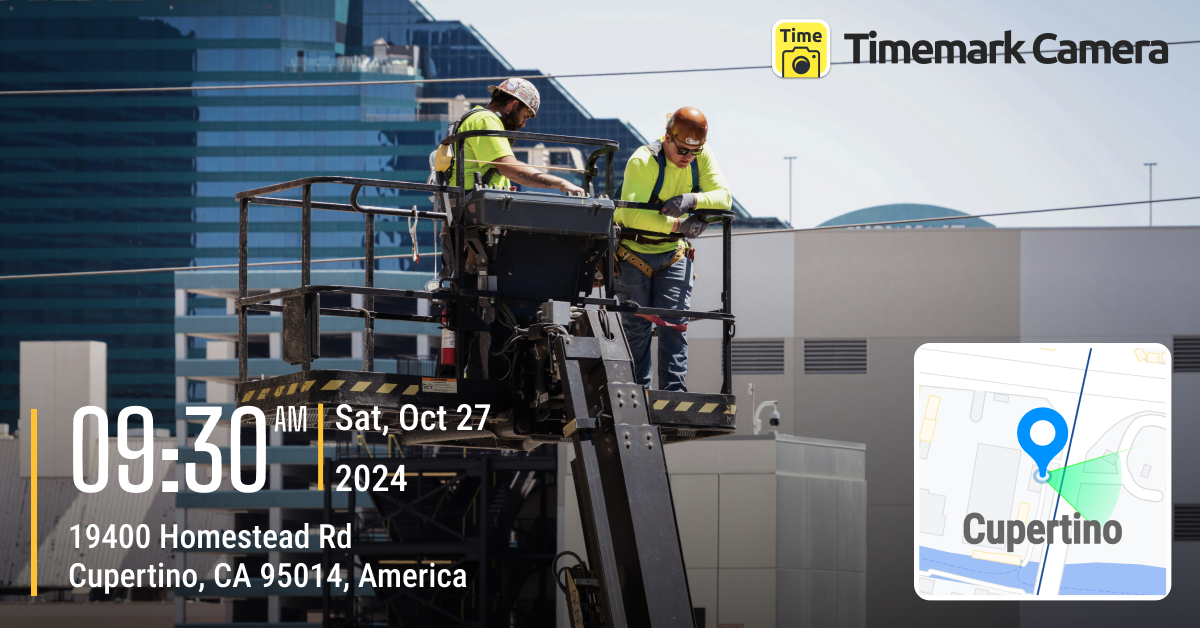
- Timemark Advantages: Photo Integrity & Compliance Timestamp & GPS Locking: Every photo records the exact time, location, and user in real time. It cannot be changed by hand. Geofencing Verification: Photos can only be taken inside the assigned job site. This adds extra protection and compliance. Tamper-Proof Proof: Photos are stored securely. They can be used for insurance claims or legal disputes.
- Comparison with CompanyCam CompanyCam lets you take photos and organize them. But it does not have strict timestamps, GPS locking, or geofencing. This can make photo authenticity and legal compliance less secure. Timemark makes every photo verifiable and tamper-proof.
2. Better Cost-Effectiveness & Transparent Pricing
- Timemark Advantages: Flexible & Attractive Plans: Timemark offers subscription options that scale easily with your team. Lower Total Cost of Ownership: Keep overall expenses manageable without sacrificing functionality. Higher ROI: Get the same features as other tools, but with greater value and return on investment.
- Comparison with CompanyCam CompanyCam’s plans start at $79 per month for 3 users. Costs can rise quickly as teams grow. Timemark costs $5 per user per month. There is no minimum number of users. It has the same essential features. This makes Timemark cheaper and easier to use for growing teams. It works well for contractors, roofers, and field service workers.
3. Ease of Use in the Field
- Timemark Advantages: One-Tap Capture & Upload: A clean, simple interface that reduces steps and cuts training time for field teams. Offline Sync: Works reliably even in areas with no network connection. Fast Project & Folder Setup: Quickly organize photos with an intuitive structure.
- Comparison with CompanyCam Timemark gives field teams a simple one-tap interface. It has reliable offline sync and fast project setup. CompanyCam’s workflow can feel more cluttered. It works offline. But opening saved projects and uploading photos later is not very smooth.
4. Reporting & Workflow Integration
- Timemark Advantages: Professional Report Generation: Make PDF reports with one click. Include your logo, clean layouts, and full photo information. Integration Capabilities:Potential integrations with CRMs and project management tools to streamline workflows.
- Comparison with CompanyCam Timemark lets you make professional PDF reports with full metadata in one click. It also works with CRMs and project tools. CompanyCam’s reports are less customizable and have fewer integration options.
Timemark: Designed to Fit Any Team’s Needs
- For robust, enterprise-level management: Timemark stores all field photos and project data in the cloud. It provides audit-ready reports with GPS and timestamps. It can grow easily for large teams.
- For mobile-first field management and documentation: Capture, upload, and organize job-site photos on the go. Timemark has a mobile-friendly interface for speed, offline access, and real-time updates. You can also export reports and data as Excel, PDF, or KMZ files. This makes documentation and sharing much easier.
- For job management and CRM: Keep track of every project, task, and client. Use organized folders and job tags. You can also add CRM integrations to make workflows easier.
- For unique features: Timemark gives geofencing, tamper-proof photo checks, and customizable reports. Every photo is real and professionally documented. You can also export data as Excel, PDF, or KMZ files to share easily and stay compliant.
- For affordability and simplicity: Timemark costs only $5 per user per month. There are no hidden fees. You can manage unlimited projects. It offers enterprise-level photo management in an easy and affordable way.
Timemark can handle all your needs. It helps with team management, field photos, CRM tracking, and photo checks that can’t be changed. You can export reports as Excel, PDF, or KMZ. With prices starting at $5 per user each month, it is accurate, fast, and affordable.
About Timemark
Timemark is a jobsite photo documentation app with timestamp, GPS geotag, and on-site notes. With Teamspace, field teams can automatically collect, organize, search, and export job photos across projects.
Timemark empowers construction, field service, telecom, and transportation teams to capture verifiable job photos to prevent disputes, support claims, and ensure project transparency. Timemark makes job photos trusted, organized, report-ready, and searchable. For setup instructions and product guidance, visit the Timemark Help Center.