
Change Order Disputes: The Photo Documentation Habits That Protect Your Margin
Gloria · May 13, 2026

A client points out a change on site. A superintendent gives a quick “go ahead.” The crew keeps working because stopping would delay the schedule. Everyone assumes the written change order will catch up later.
But if payment is challenged, that verbal approval becomes hard to defend. The contractor may need to prove who requested the work, who approved it, what changed, and whether the work was completed.
That is where many change order disputes begin: not with bad work, but with a weak approval trail.
Why change orders become margin leaks
The risk starts when the work moves faster than the paperwork. A client gives verbal approval. A superintendent says to proceed. The crew completes the work. Later, the office has to prove why that work should be paid.
By then, the cost has already been paid. Labor hours are gone. Materials are installed. Equipment was used. If the approval trail is unclear, the contractor may have to discount the invoice, wait months for payment, or write off the extra work.
That is why change order documentation is not just paperwork. It is cash flow protection.
Documented vs. undocumented change orders
The same scope change can lead to two very different outcomes.
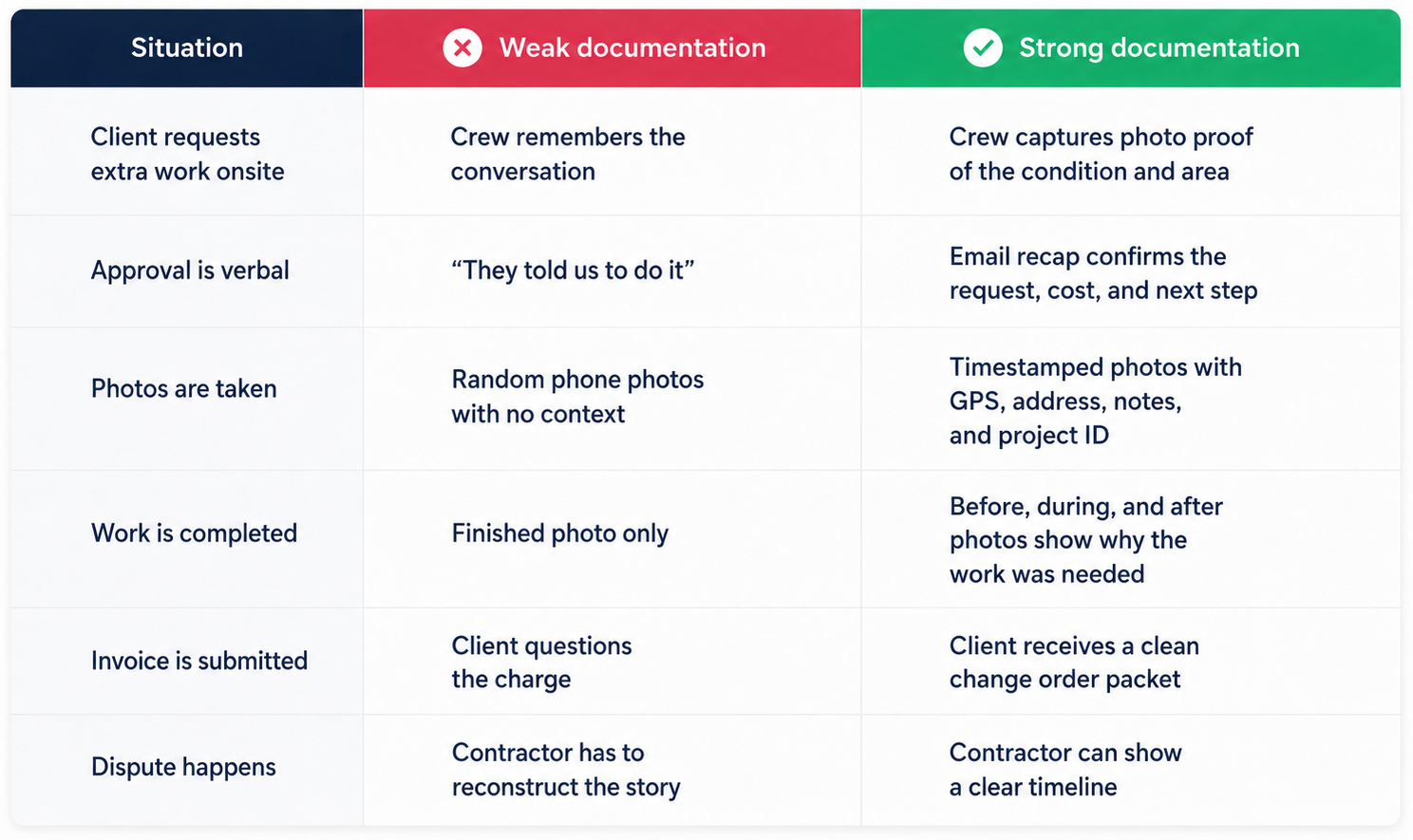
The difference is not whether photos exist. The difference is whether those photos can answer the questions that matter: what changed, where it happened, when it was identified, who approved it, what work was performed, and why it was outside the original scope.
If your photos cannot help answer those questions, they may not protect your margin when payment is challenged.
The 4-photo standard for every change order
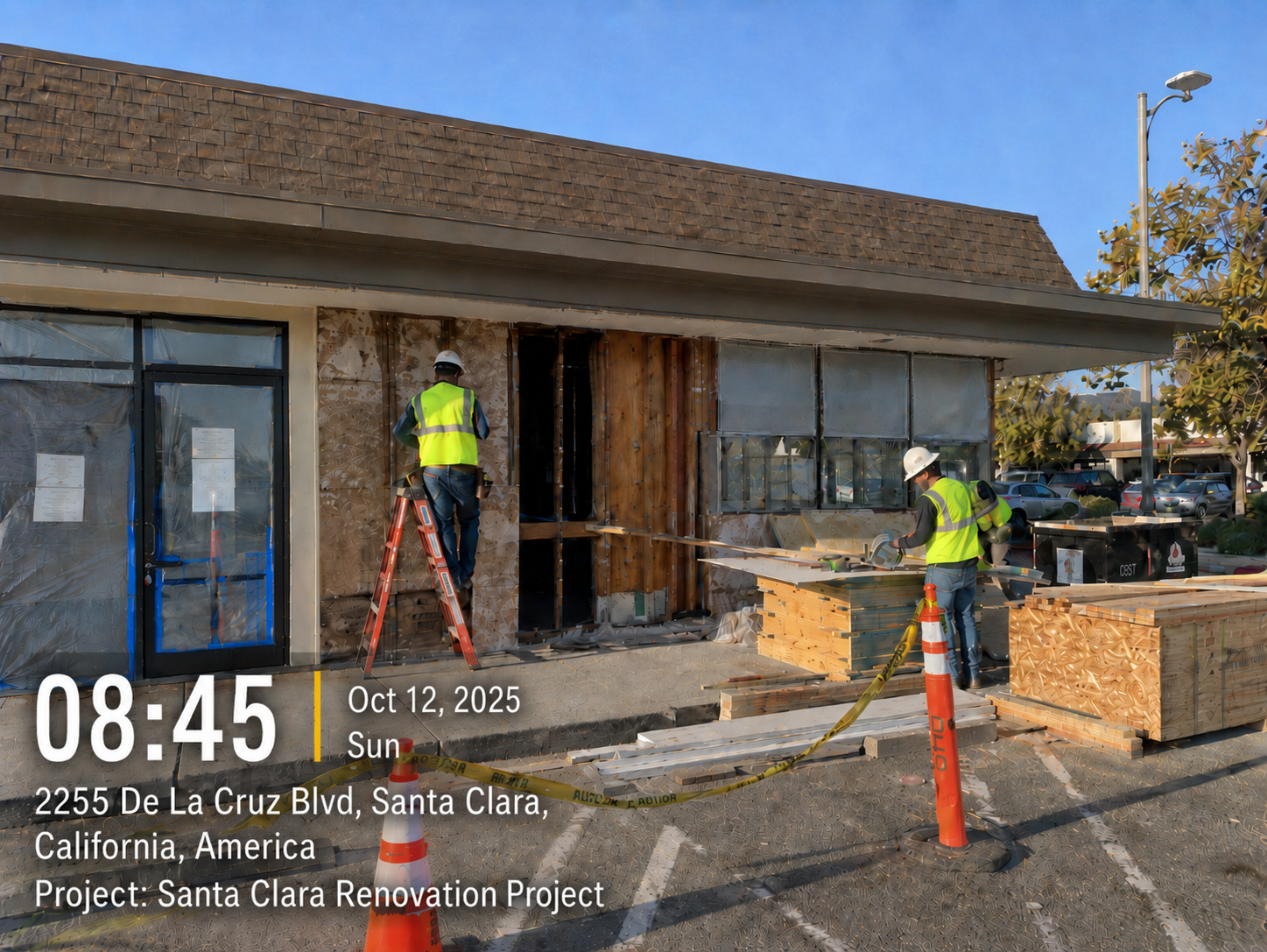
A strong change order habit does not require long field reports. It starts with four photos.
1. Original condition
Take a photo before extra work starts.
Show the condition that triggered the change, such as hidden damage, blocked access, missing backing, or added owner scope.
Use one wide photo for location and one close-up for detail.
2. Change area with context
Take a photo that connects the issue to the jobsite.
Include timestamp, GPS, address, project ID, and notes if possible. A photo with visible context is much stronger than a random image in a camera roll.
For remote PMs and business owners, this helps the field photo explain what happened without a long back-and-forth.
3. Work in progress
Capture the added work while it is being performed.
This helps show labor, sequencing, and work that may be covered later, such as blocking before drywall, conduit before cover-up, or trenching before backfill.
Once the work disappears, the photo may be the only proof left.
4. Completed work and approval record
Take a final photo when the work is complete.
If there is a signed change order, field ticket, work authorization, or written approval, capture that too. Keep it with the same project record.
The goal is to connect the work, approval, time, and location.
How to capture verbal approvals before the paperwork catches up
That does not mean your team should rely on memory.
Train your foreman or lead tech to pause and say:
“This looks outside the original scope. I’ll document the condition now and send it to the office so we can follow up with a change order.”
Before the work starts, capture photos with the time, location, scope, and a short note. For example:
- “Owner requested added outlet at kitchen island”
- “Hidden rot found after trim removal”
- “Existing conduit blocked planned route”
- “Client approved added fence section onsite”
Then send a same-day email recap and add the item to your change order log. This does not replace a signed change order, but it creates a written trail while the event is still fresh.
The goal is simple: turn “we’ll remember this later” into a documented record before the work disappears.
A simple 3-step workflow for contractors
Good change order documentation should not stop at the field photo. The photo needs to move into a clear workflow that the office can review and the client can understand.
Step 1: Field captures proof before work moves on
When a change appears, the crew should document it before the condition changes, the work gets covered, or the conversation gets forgotten.
Each photo should include the key context: time, GPS location, address, project ID, and a short note explaining what changed.
This matters because basic phone photos can show what happened, but they do not always prove when and where it happened. For disputed work, the real question is not just “Do you have a photo?” It is “Can this photo be trusted?”
Step 2: Office builds the change order packet
At minimum, the packet should include:
- Before, progress, and completed photos
- Written approval or same-day email recap
- Change order form
- Cost breakdown
- Schedule impact
- Labor, material, or subcontractor backup
- Invoice or payment record
The goal is not to create more paperwork. The goal is to make the change easy to understand and hard to dispute.
Step 3: Client receives a clear record
Send the client a clean packet, not scattered attachments.
The record should answer the key questions quickly: what changed, where it happened, when it happened, who requested or approved it, what work was completed, and what cost or schedule impact followed.
This is where a construction photo app like Timemark can help. Timemark lets field teams capture photos with timestamp, GPS, address, notes, and project details at capture. With Teamspace, photos can be automatically collected and organized by project, so the office can review records without chasing crews for uploads.
When the packet is clear, the conversation moves from “I never approved that” to “Here is the documented record.”
About Timemark
Timemark is a jobsite photo documentation app with timestamp, GPS geotag, and on-site notes. With Teamspace, field teams can automatically collect, organize, search, and export job photos across projects.
Timemark empowers construction, field service, telecom, and transportation teams to capture verifiable job photos to prevent disputes, support claims, and ensure project transparency. Timemark makes job photos trusted, organized, report-ready, and searchable. For setup instructions and product guidance, visit the Timemark Help Center.