
5 Best CompanyCam Alternatives in 2026
Elvis · Nov 20, 2025

Quick answer
Timemark is the top CompanyCam alternative if you need job site photos with network time, GPS location, and coordinates stamped directly onto every image. For a crew that shares photos in Teamspace, the plan to compare with CompanyCam is Timemark Business at $7 per user per month. SiteCam is a strong option for teams that need to pin photos to floor plans and want a free tier. busybusy fits contractors whose main need is GPS time tracking, job costing, and payroll support. Fieldwire is better for commercial work managed from construction drawings, while Raken is built for formal daily reporting.
Why contractors look for a CompanyCam alternative in 2026
CompanyCam does not offer a free tier. It offers a free trial, then paid plans.
Its Core plan costs $63 per month billed annually or $79 billed monthly. Core includes 1 user, and additional users cost $29 each.
Crew costs $119 per month billed annually and includes 3 users. Scale costs $249 per month billed annually and also includes 3 users. Additional users on both plans cost $29 each.
Enterprise is for teams of 50 or more users and is priced through sales.
If you priced CompanyCam a year ago, note that its old three-user minimum is gone. Core now starts with a single user, which can make it more practical for a solo contractor or a very small crew.
What is CompanyCam?
CompanyCam is a job site photo and project documentation app used by contractors. It automatically organizes photos by project and location, helping crews document work from the field.
The platform includes photo annotations, before-and-after comparisons, checklists, daily logs, signatures, and guest access for clients. Your team can follow work through a live project feed.
CompanyCam also offers a portfolio website, integrations with many contractor CRMs, and paid-tier AI credits. Its marketing suite add-on can turn job photos into social posts and send Google review requests.
It is especially common in US roofing, restoration, and exterior trades, where teams need to document property conditions, work progress, and completed jobs.
The 5 best CompanyCam alternatives
- Timemark — Verifiable time and location on every job site photo. Starts at Free; Business for teams is $7 per user per month.
- SiteCam — Photo documentation with floor plan and map pinning. Starts at Free.
- busybusy — GPS time tracking with job photos, job costing, and payroll tools. Starts at Free.
- Fieldwire — Tasks and photos connected to construction drawings. Starts at Free.
- Raken — Formal daily reports, time cards, and production tracking. Pricing quoted by sales.
1. Timemark — verifiable job site photo documentation
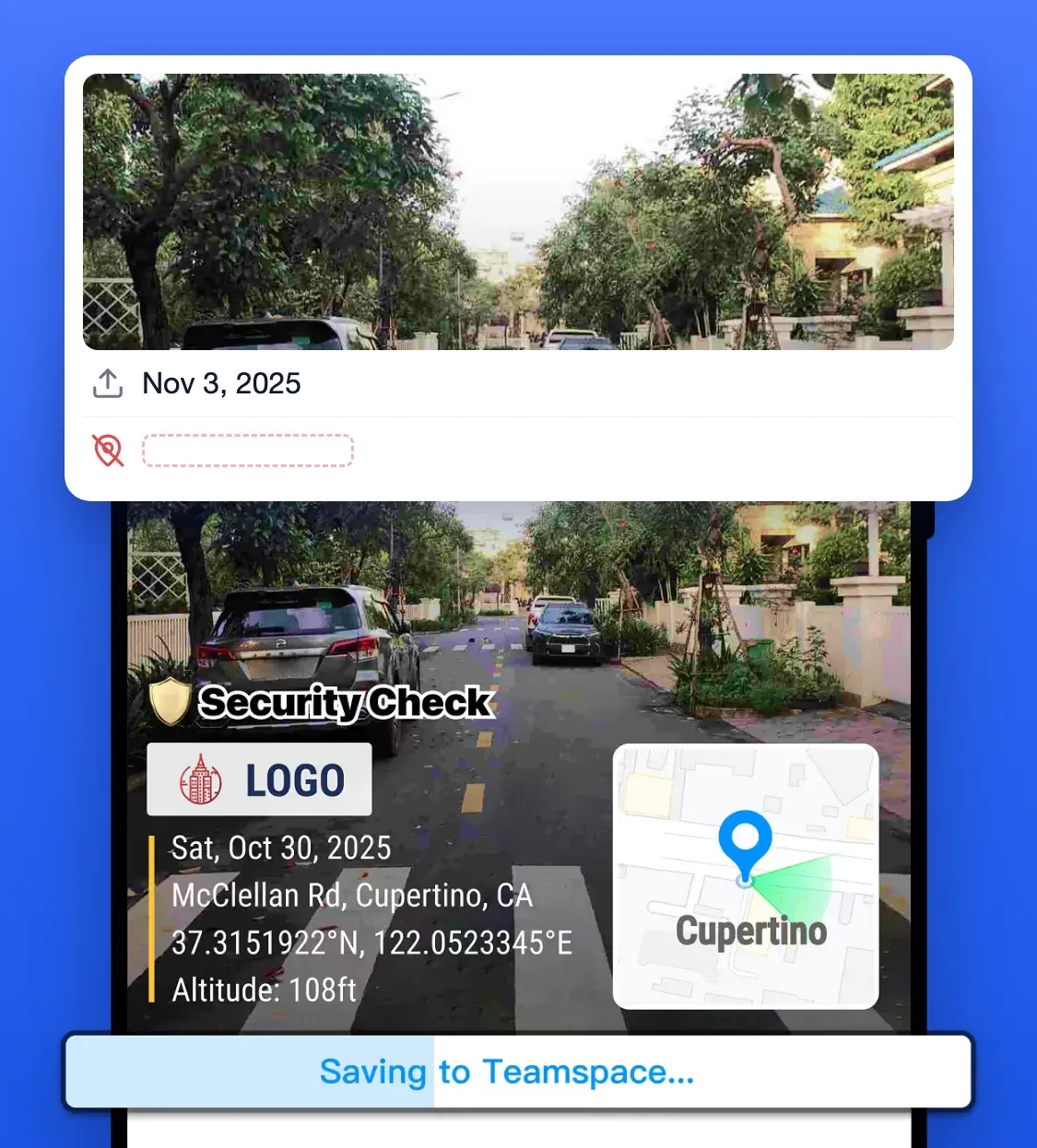
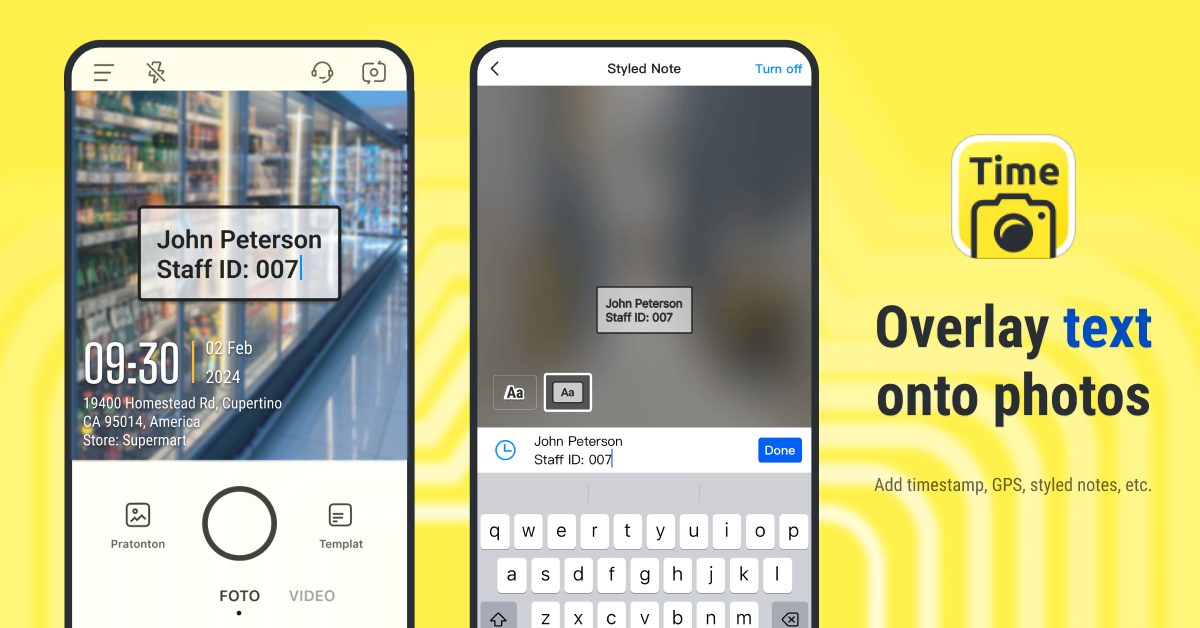
Timemark is a photo documentation app for contractors who need a clear record of when and where a photo was taken. It stamps network time, GPS location, and coordinates onto every photo as it is captured, including front-camera selfies. The phone clock does not control the time stamp, and the original server-side record can be checked at verify.timemark.com or in the app.
Timemark: what it does best
- Stamps network time, GPS location, and coordinates directly onto every photo.
- Supports DMS, DD, and UTM coordinate formats.
- Works without a signal and syncs photos when the device reconnects.
- Organizes team photos by person, project, and date in Teamspace.
- Exports PDF, Excel, ZIP, and KMZ reports, plus photo-backed timesheets from the CLOCK tab.
Timemark: where it falls short
- Does not offer drawing or floor plan pinning.
- Does not include 360 photo capture.
- Does not include CRM, estimating, invoicing, or scheduling tools.
- Free Teamspace is limited to 100 photos and 3 projects, so a crew replacing CompanyCam will need the Business plan.
- It is a photo documentation tool, not a full project management platform.
Timemark pricing
- Free tier, Teamspace limited to 100 photos and 3 projects.
- Business $7 per user per month, or $60 per user per year billed annually. This is the plan to compare with CompanyCam: it raises Teamspace to 300,000 photos, unlimited projects, central team billing and SharePoint and Google Drive integration, and it starts with a free trial.
- Enterprise listed as coming soon.
Choose Timemark if you need photos that show a verifiable time, location, and coordinates for job records, disputes, claims, or customer documentation.
2. SiteCam — photos pinned to floor plans
SiteCam is a photo documentation platform that lets you pin photos to PDF plans and maps. It also includes tags, descriptions, unique photo IDs, markups, before/during/after tracking, and shareable report links. Its free tier does not expire, which can suit a small team handling a limited number of projects.
SiteCam: what it does best
- Pins photos to an exact point on a PDF floor plan.
- Supports plan and map-based photo documentation.
- Includes photo tags, descriptions, unique IDs, and markups.
- Tracks before, during, and after work.
- Offers a free tier with unlimited team members.
SiteCam: where it falls short
- The free tier is capped at 500 photos, 25 reports, and 3 projects.
- Free-tier videos are limited to 1 minute.
- Pro costs $29 per user per month.
- Enterprise requires a minimum of 50 users.
- Teams that do not use plans may not need its plan-based workflow.
SiteCam pricing
- Free $0 per user per month, capped at 500 photos, 25 reports, 3 projects, unlimited team members, 1 minute videos.
- Pro $29 per user per month for unlimited photos, reports and projects plus 10 minute videos.
- Enterprise minimum 50 users, adds SSO, custom roles, account manager.
Choose SiteCam if your crew needs to show exactly where each issue, repair, or progress photo sits on a floor plan.
3. busybusy — time tracking, job costing, and payroll
busybusy is a workforce management app built around GPS time tracking. It includes clock-in and clock-out records, job costing, equipment tracking, timecard signatures, overtime rules, supervisor tools, and payroll automation. Photos are part of the wider time and job record rather than the center of the product.
busybusy: what it does best
- Tracks crew hours with GPS records and breadcrumbing.
- Supports job costing and production tracking.
- Includes equipment tracking.
- Offers digital timecard signatures and overtime rules.
- Includes clock-in photo verification, kiosk punch clocks, and payroll automation.
busybusy: where it falls short
- Photos sit alongside time entries instead of serving as the main record.
- The $40 admin licence is added to paid per-user pricing.
- Teams focused only on photo documentation may pay for workforce tools they will not use.
- Its workflow is more focused on labor management than project photo reporting.
busybusy pricing
- Free tier with GPS time tracking, job costing, equipment tracking and unlimited users.
- Pro $9.99 per user per month plus a $40 admin licence, first user included.
- Premium $14.99 per user per month plus the same $40 admin licence.
Choose busybusy if your main problem is tracking labor hours, job costs, equipment, and payroll rather than documenting photos alone.
4. Fieldwire — construction tasks tied to drawings
Fieldwire, owned by Hilti, is construction management software built around drawings and plans. You can view sheets, pin tasks and photos to plan locations, compare sheet revisions, manage punch lists, and complete custom forms. Higher tiers add features such as BIM viewing and 360 photos.

Fieldwire: what it does best
- Pins tasks and photos to exact locations on construction drawings.
- Supports punch lists and assigned task workflows.
- Compares drawing revisions and manages sheet version control.
- Includes custom forms and specification handling.
- Fits commercial and specialty contractors working from plan sets.
Fieldwire: where it falls short
- Photo metadata stamps require the Pro tier or above.
- Per-user pricing can rise quickly across a full crew.
- It can be more than a residential contractor needs when there is no plan set.
- Its drawing-based workflow takes more setup than a simple photo app.
Fieldwire pricing
- Basic free for up to 5 users, 3 projects and 100 sheets.
- Pro $39 per user per month.
- Business $64 per user per month.
- Business Plus $89 per user per month.
- Custom contracts for unlimited users, SSO and API.
Choose Fieldwire if drawings, task assignments, punch lists, and sheet revisions drive how your team manages job site work.
5. Raken — formal daily reporting for construction teams
Raken is a field reporting platform for general contractors, owners, and larger construction teams. It helps crews create structured daily reports from the job site while giving office staff consistent records of labor, production, safety, and progress. Its tools include daily reports, time cards, toolbox talks, checklists, observations, and production tracking.
Raken: what it does best
- Produces formal daily report packages for general contractors and owners.
- Tracks production against budget.
- Includes digital time cards and field reporting.
- Supports toolbox talks, checklists, and observations.
- Gives office teams structured reports from field entries.
Raken: where it falls short
- Does not publish pricing for self-service comparison.
- Small crews need to speak with sales before knowing the cost.
- Its reporting workflow can feel heavy for teams that only need photo proof.
- It is more focused on formal reporting than quick photo capture.
Raken pricing
- Does not publish pricing. Quoted by sales.
Choose Raken if you need structured daily reports, labor records, production tracking, and owner-ready documentation.
Where CompanyCam is still the better choice
- You need a broad contractor workflow beyond photos, including checklists, daily logs, signatures, annotations, and before-and-after comparisons in one system.
- You want clients to follow work through a live project feed with guest access.
- You need a portfolio website built from completed project photos.
- Your business relies on integrations with contractor CRMs and other connected tools.
- You want sales and marketing features that turn project photos into social posts and support Google review requests.
- Your subcontractors, roofing crews, restoration partners, or office staff already know CompanyCam and use it in their daily workflow.
Frequently asked questions
Is there a free version of CompanyCam?
No, CompanyCam does not have a free version. It offers a free trial, then requires a paid subscription. Core starts at $63 per month billed annually or $79 billed monthly for 1 user. Contractors looking for a no-cost starting point can compare free tiers from Timemark, SiteCam, busybusy, or Fieldwire.
What does CompanyCam cost per month?
CompanyCam Core costs $63 per month billed annually or $79 billed monthly and includes 1 user. Crew costs $119 per month billed annually and includes 3 users. Scale costs $249 per month billed annually and includes 3 users. Additional users cost $29 each, while Enterprise pricing is quoted by sales for teams of 50 or more users.
What are the key differences between SiteCam and CompanyCam?
SiteCam focuses on photo documentation tied to floor plans and maps, while CompanyCam offers a wider contractor workflow. CompanyCam includes live project feeds, checklists, daily logs, signatures, client guest access, portfolio tools, CRM integrations, and marketing features. SiteCam offers a free tier and is especially useful when you need to place photos at exact locations on a PDF plan.
How do I download all photos from CompanyCam?
CompanyCam supports project photo export and sharing from its own interface. The practical approach is to export photos project by project, especially before a subscription lapses or before closing out an account. Save exports in an organized folder structure so photos remain connected to the correct customer, address, project, and job date.
What is the cheapest CompanyCam alternative?
Timemark has the lowest paid team plan in this list: Business costs $7 per user per month, or $60 per user per year billed annually, and includes Teamspace with up to 300,000 photos. It also has a free tier. SiteCam, busybusy, and Fieldwire also offer free starting plans. The lowest-cost choice depends on whether you need photo documentation, floor plan pinning, time tracking, or drawing-based task management.
What is the best CompanyCam alternative for Android?
Timemark is a strong CompanyCam alternative for Android if you need time, GPS location, and coordinates stamped onto job site photos. It works without a signal and syncs when the device reconnects. SiteCam is a better Android choice for plan pinning, while busybusy is better when Android devices are mainly used for crew time tracking.
What is the best CompanyCam alternative for a solo contractor?
Timemark is a practical choice for a solo contractor who needs affordable photo documentation with time and location records. Its free tier supports Teamspace with up to 100 photos and 3 projects. Once you need more than that, Business costs $7 per user per month and raises Teamspace to 300,000 photos and unlimited projects. CompanyCam Core now also starts with 1 user, but costs $63 per month billed annually or $79 billed monthly.
About Timemark
Timemark is a jobsite photo documentation app with timestamp, GPS geotag, and on-site notes. With Teamspace, field teams can automatically collect, organize, search, and export job photos across projects.
Timemark empowers construction, field service, telecom, and transportation teams to capture verifiable job photos to prevent disputes, support claims, and ensure project transparency. Timemark makes job photos trusted, organized, report-ready, and searchable. For setup instructions and product guidance, visit the Timemark Help Center.