If you take photos for work, whether it’s for a report, documentation, or just showing your team what’s going on, you’ve probably run into this: a great photo with little context. No date. No time. No way to tell when it was taken unless you dig through metadata. But metadata won’t help if the photo gets screenshotted, compressed, or sent through WhatsApp. I’ve dealt with this too many times when I was working as an office coordinator.
What you need is a visible timestamp right on the photo. In this guide, I’ll walk you through what actually works. Whether you want something simple and quick or or need bulletproof documentation for an inspection, I’ve got you covered.
Table of Contents:
- Method 1: Built-In Android Options
- Method 2: Using Timestamp Camera Apps (Real-Time Stamps)
- Method 3: Adding Timestamps to Existing Photos (Post-Capture)
- Basic vs. Professional Timestamp Tools
- Pitfalls of Timestamping Existing Photos
1. Method 1: Built-In Android Options
Many Android models now include a feature to add a visible watermark in their camera app settings. It’s not available on every model, but it’s worth checking. Here’s how:
- Open your Camera app.
- Tap the gear icon to open settings.
- Look for options like “Watermark” or “Timestamp.”
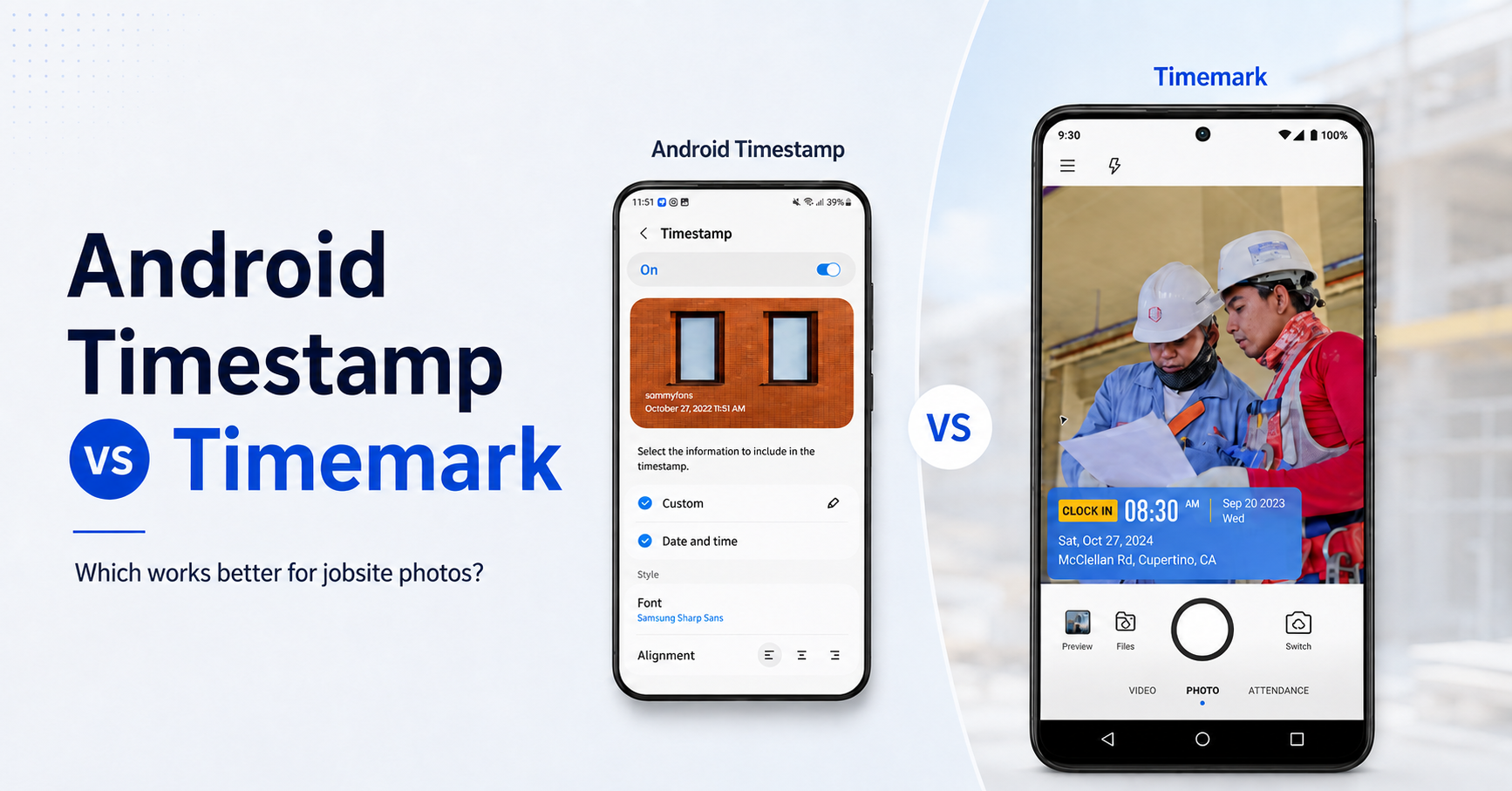
Phones with custom interfaces, like Samsung One UI, Xiaomi MIUI, or OnePlus/Oppo’s ColorOS, often include a Watermark feature that adds the date and time to every new photo. On some models, you can even tweak the font and alignment. For example, Samsung lets you choose the font and alignment for the watermark
Here's a quick video demo showing how to turn on the photo time stamp on a Samsung S23 device:
Limitations of Built-In Stamps
First, many phones (especially those running “pure” Android like Google Pixel phones or Moto/Nokia devices) do not have a native timestamp option.
Second, even if you have a built-in timestamp toggle, it may be pretty basic. Often you get one style of text and that’s it. If it clashes with your photo or you wish you could include more info (like location or custom text), the default won’t go that far.
Third and most importantly, this method doesn't guarantee authenticity. Anyone can change the phone clock and take a photo with a fake timestamp. That won’t hold up if you need the photo for documentation or proof.
2. Method 2: Using Timestamp Camera Apps (Real-Time Stamps)
If your built-in camera lacks a timestamp feature, but you take a lot of photos on the job, you can install a timestamp camera app. Real-time stamping gives you the cleanest workflow. This is the method I personally use and trust the most.
What is a timestamp camera?
These are camera apps that automatically imprint the date and time (and often other info) as you capture the photo.
A timestamp camera lets you add date and time to photos the moment you take them. Many timestamp camera apps also add extra details like location, notes, logo, or project info. And this is where it gets helpful in real-world workflows.
How to use a timestamp camera to add date/time to photos?

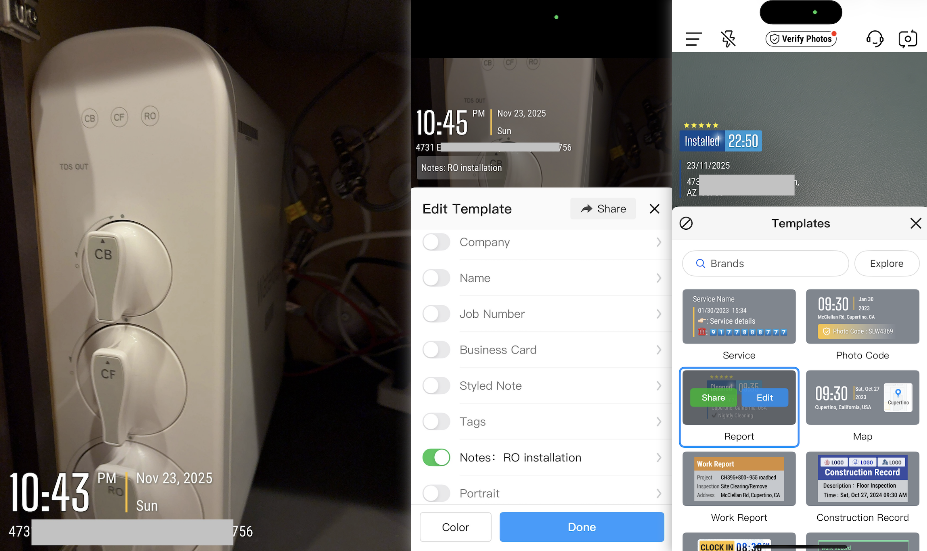
- We'll use Timemark Camera in this example. Open the Timemark Camera. You’ll see the default timestamp with date, time, and location.
- Tap the timestamp area to add more fields like weather, GPS coordinates, notes, logo, and more.
- Scroll through the templates to pick one that best fits your documentation needs.
Timemark makes it simple to capture timestamped photos without the usual manual steps. Just open the app, take your shot, and the date and time appear instantly on the image along with any extra fields you’ve chosen, like GPS, project ID, or technician name.
For teams that need reliable records, Timemark also helps ensure integrity. It checks for system clock changes and flags anything suspicious. This short video shows how Timemark does its magic:
3. Method 3: Adding Timestamps to Existing Photos (Post-Capture)
What about photos you’ve already taken? Maybe you’re looking at a folder of job site images that need to be documented. Here are a few simple ways to add a date and time stamp to existing images on Android:
Option 1: Use a built-in date sticker
Some manufacturers like Samsung’s Gallery app allows adding a date sticker manually to a photo after it’s taken.
Here’s how:
- Open the photo in the Gallery app.
- Tap Edit, then go to Stickers.
- Look under the “Calendar” section and select a date/time sticker.
- Drag it into place and save the photo.
This effectively lets you place a timestamp label on the photo. The catch? It’s manual labor. You’d have to do this for each photo, one by one. Great for the occasional image you want to mark, but not feasible for large batches or ongoing needs.
Option 2: Use a batch editing app
These apps make it easy to apply the same look to many photos at once. They are simple, quick and great for teams that want a consistent format. The only catch is that it may fall short for serious documentation, since they rely on editable metadata.
1. DateStamper
DateStamper reads each photo’s metadata and stamps the correct time on your images. It’s fast, simple and great for bulk updates. However, if you need to stamp other metadata like location or add custom text, you’ll need the paid version.
2. PhotoMarks
PhotoMarks lets you apply text, watermarks or timestamps to a whole group of photos at once. I like it because the editing flow is simple and easy to repeat. However, the mobile app has fewer customization options than the desktop version, so you may hit limits if you want more control.
3. TimeStampIt
TimeStampIt lets you import photos and add timestamps, captions and location in batch. It’s simple and efficient for documenting after the fact. The only drawback is that custom formatting options are limited.
4. Basic vs. Professional Timestamp Tools: When to Step up and What to Look for
There are tons of timestamp camera apps out there. Some simply stamp whatever your system clock says and add basic info like date and time. Others go further. They cross-check and validate the timestamp and GPS before imprinting it on the photo to ensure the authenticity.
If you’re a field professional where your photos might end up in a report, court case, or audit, consider a professional timestamp app. It provides peace of mind that your images will hold up to scrutiny. Another sign it’s time to level up: if you find yourself manually writing dates on photos or worrying "could someone accuse me of editing this timestamp?", it might be worth stepping up to a verified solution.
So what should you look for in a timestamp camera built for work? Here are the key factors I always check:
- Anti–tampering time: If the app just pulls from your phone’s clock, anyone can mess with it. Look for apps that check the time against a server or verify GPS.
- Additional fields: A date and time are a good start. But most teams also need GPS, job numbers, technician names, or project IDs. The more fields you can stamp at once, the less you have to type later.
- Reliability: If an app keeps freezing or throwing ads at you, it’s just getting in the way. You need something that stays steady when you’re out in the field.
- Photo organization: Field teams take a lot of photos. A great app helps sort them into folders by date, location, or project, so you’re not stuck scrolling through your camera roll at the end of the day.
- Reporting: Not a must-have, but some apps I’ve tried can even turn your photos into reports. Extra time saved!
Below is a quick comparison of the top timestamp camera apps. And yes, I’ve tested all of these so you don’t have to!
5. Pitfalls of Timestamping Existing Photos
This is the part most articles skip because it's where things can quietly go sideways. The approaches mentioned in the previous section work great when you already have a large batch of photos. But they all rely on metadata, and that’s where the problems start.
1. Messaging apps strip metadata
WhatsApp, Messenger, and other messaging apps compress photos. The recipient often gets a clean, metadata-free file. If you need to send work photos through chat apps, it’s better to share ones that already have a visible timestamp.
2. Metadata can be edited
On iPhone you can change the time and date of a photo. You can even change the location. It’s handy for organizing personal albums, but it also means the original information isn’t always reliable. If you ever need a photo to serve as real proof, this flexibility can work against you.
3. Simple edits can wipe data
Cropping, filtering or exporting through certain apps can rewrite or remove EXIF information. It happens more often than people think.
All of this is why many field teams eventually move to purpose-built timestamp tools. When you need photos to stand up in audits, reports, or disputes, you want proof, not just a pretty label.
Final thoughts
Adding a timestamp to your Android photos can be as simple or as sophisticated as you need it to be. On one end, you have the quick fixes: toggling a setting or using a simple timestamp camera app to get that comforting date stamp on your snapshots. On the other end, you have professional solutions ensuring that every timestamp is locked-in and trustworthy.
I once had to document roof damage before a repair job. We needed to show exactly when each photo was taken in case there were any disputes with the client later. Using a secure timestamp tool removed all the guesswork. The photos told a clear story, and no one questioned the timeline.
So here’s my take: if you just want to remember fun times, go ahead and use the built-in features or a free timestamp camera. If you rely on photos as proof, consider leveling up to a more robust tool like Timemark that offers verification. They help you stand behind your photos with confidence.
Frequently Asked Questions
- Can timestamped photos hold up in court?
The truth is simple. A timestamp on a photo does not guarantee anything. What matters is whether the underlying data is trustworthy.Here are what lawyers and insurers look for: 1) Can the timestamp be manipulated? 2) Is the metadata intact and consistent? 3) Was the image edited?
- Are timestamp camera legal?
Yes. Timestamp cameras are legal to use. Adding visible date and time to your own photos is simply a form of documentation. In fact, many industries rely on timestamped photos for inspections, reports, compliance and record-keeping.
- What is the purpose of timestamp?
A timestamp shows when a photo was taken. It adds context and helps you prove timing for work, inspections, deliveries, claims or any situation where “when” matters. It also keeps your photos organized and easier to understand later.
- How do I turn on the time stamp on my camera?
Some Android devices have a built-in toggle under Camera settings, but the iPhone does not. For iPhone users to show the time and date on the photo itself, you need to use a timestamp camera app or create a Shortcut that overlays the timestamp after capture. Some Android devices have a built-in toggle under Camera settings, but the iPhone does not.
- How do I take a photo with a timestamp?
If you use a timestamp camera app, the steps are simple. Open the app, take the photo, and the timestamp appears instantly on the image. Apps like Timemark can also add location, notes and other fields as you capture
- Can the timestamp be manipulated?
For most timestamp camera apps, yes. Someone can manipulate the timestamp by changing the device clock. And for date-stamper apps, people can even screenshot an image and re-stamp it, which makes the timestamp easy to alter. However, Timemark goes further. It validates your time and location against network data ,so the timestamp and GPS can’t be manipulated through clock changes or using fake GPS.
- What if the image, but not the timestamp, has been edited?
If someone edits the image but leaves the timestamp untouched, most apps can’t tell. Timemark adds a layer of protection. Timemark solves this by keeping a verified copy on the server (when the photo code is turned on). When you run the photo through the Verification Center, it will tell you right away if the image has been changed.
- Why do you need a timestamp camera?
A timestamp camera solves three big problems:
1. You have a lot of photos: You and your team take dozens of photos on the job. Later, when you're prepping a report and run them through a bulk editing tool, you realize the timestamps reflect when the photos were forwarded or edited, not when they were actually taken. Adding the correct date one by one? No thanks. Real-time stamping like Timemark Camera saves you from that mess.
2. You need consistent documentation: Field teams need photos that look uniform. Same format. Same placement. Same data points included. Timemark Camera makes this easy with pre-built watermark templates you can use across the whole team.
3. You need solid photo proof: Metadata can be changed. On iPhone or Android, you can edit the time, date, even the GPS tag. That weakens the credibility of your photos when they’re needed for claims, disputes or legal documentation. Timemark is the only timestamp camera app that verifies the time and location at capture, so the core details stay trustworthy.


.png)