
Der beste Weg, Fotos für den professionellen Gebrauch mit einer Gruppe zu teilen
Der beste Weg, Fotos mit einer Gruppe zu teilen: Timemark sammelt, organisiert und speichert Ihre Aufnahmen automatisch – die beste kostenlose App-Lösung für professionelle Arbeitsdokumente.

3,7 Millionen Feldprofis und Teams vertrauen darauf






Timemark: Der beste Weg, Fotos mit einer Gruppe zu teilen – eine intelligente Lösung für Ihre Schwachstellen
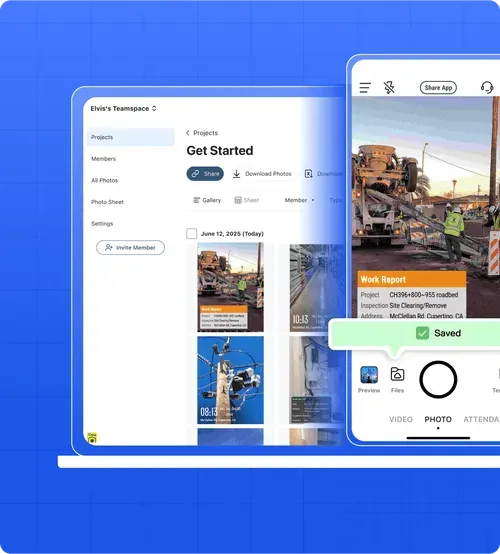
Das Teilen von Gruppenfotos per SMS oder E-Mail ist ein Albtraum. Dateien gehen verloren und Verzögerungen verlangsamen die Arbeitsabläufe im Team. Timemark lädt Fotos automatisch an einem Ort hoch und alle im Team erhalten sofortigen Zugriff. Ihre Kamerarolle ist ein Chaos, Hunderte von Fotos sind durcheinander und schwer zu finden. Gruppenfotos werden automatisch organisiert, sodass Sie nie endlos scrollen müssen, um das richtige Foto zu finden. Sie fügen Arbeitsbeschreibungen und Notizen direkt zu Fotos in Timemark hinzu. Alle Details werden mit der Aufnahme gespeichert, so dass Sie über eine überprüfbare Aufzeichnung verfügen

Hauptmerkmale
Automatische GPS-Standortmarkierung
Starten Sie kostenlos durch

Anmerkungen zu Jobnotizen
Mit Timemark können Sie Stellenbeschreibungen und Notizen zu Fotos hinzufügen und so das Chaos unorganisierter Teamdokumente beseitigen. Als beste Möglichkeit, Fotos mit einer Gruppe zu teilen, stellt es sicher, dass Ihr Team und Ihre Kunden immer die Aufgabe hinter jedem Foto verstehen – keine Verwirrung mehr.

Fotofreigabe mit einem Klick
Mit Timemark können Sie Gruppenarbeitsfotos mit nur einem Klick in gemeinsam nutzbare PDF- oder Excel-Berichte umwandeln. Die beste Möglichkeit, Fotos mit einer Gruppe zu teilen, besteht darin, Projektfortschritte, Standortaktualisierungen oder Inspektionsergebnisse sofort mit Kunden, Stakeholdern oder Teammitgliedern zu teilen – so erhalten alle organisierte, leicht zu überprüfende Fotoaufzeichnungen.
Wissenswertes: Entdecken Sie die beste Möglichkeit, Fotos sofort mit einer Gruppe zu teilen
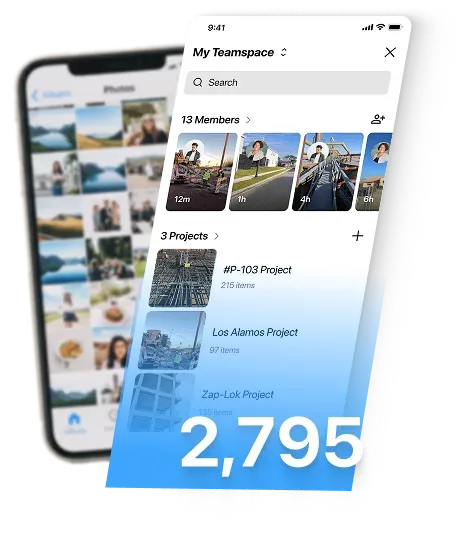
Hier ist eine lustige Statistik: Der durchschnittliche Smartphone-Benutzer speichert etwa 2.795 Fotos in seiner Kamerarolle. Kein Wunder, dass es schwierig ist, Gruppen- oder Arbeitsfotos zu finden! Timemark organisiert sie automatisch und ist somit die beste Möglichkeit, Fotos mit einer Gruppe zu teilen – so verbringen Sie weniger Zeit mit Scrollen und haben mehr Zeit mit dem Teilen.
Planvergleich
Aktueller Plan 5 $ pro Benutzer/Monat. In die App einsteigen 7 $ pro Benutzer/Monat. Upgrade. Kontaktfotos 100 100 300.000. Weitere Mitglieder. Unbegrenzt. Unbegrenzt. Unbegrenzt. Unbegrenzt. Projekte
Kundenstimmen
“Ich füge Fotos zu Inspektionen Notizen hinzu, damit meinem Team der Kontext nie entgeht. Es ist ein totaler Game-Changer.”

“Früher habe ich wichtige Fotos von meinem Team vermisst. Jetzt sammelt Timemark sie alle und ich füge Jobnotizen direkt hinzu. Timemark spart mir jeden Tag eine Stunde.”
“GPS-Tags auf den Fotos von Timemark beweisen, dass wir Websites überprüft haben. Das automatische Sammeln von Teamfotos bedeutet, dass Sie den Jungs nicht mehr hinterherjagen müssen, um ihre Aufnahmen zu machen.”
Häufig gestellte Fragen
Beginnen Sie mit der besten Möglichkeit, Fotos mit einer Gruppe zu teilen
Treten Sie Timemark kostenlos bei, bauen Sie Ihr Team auf und müssen Sie sich nicht mehr mit dem umständlichen Teilen von Fotos für die Arbeit herumschlagen.
Kostenlos starten