
370만 명의 현장 전문가와 팀의 신뢰를 받고 있습니다.










잘못된 건축 사진 문서로 인해 수백만 달러의 위험이 발생함
건설 사진 문서화는 최선의 방어책입니다. 분쟁의 70%는 기록 누락에서 시작되며, 미국 기업의 평균 비용은 4,280만 달러에 이릅니다. 지저분한 사이트 사진이나 프로젝트 비디오 공백으로 인해 비즈니스가 손상되지 않도록 하십시오!

실수에 대한 대가를 치르세요
정리되지 않은 사이트 사진은 다른 사람들이 책임을 전가하게 만듭니다. 당신은 결국 당신의 돈으로 그들의 실수를 덮게 됩니다.

안전 벌금
시간이 기록된 문서가 없으면 안전 감사는 힘들게 벌어들인 이익을 앗아가는 큰 벌금으로 변합니다.

지연된 핸드오버
지저분한 문서는 작업 속도를 늦추고 고객을 화나게 하며 향후 작업을 경쟁업체에 바로 떠맡깁니다.
건축 사진 문서를 만드는 방법

1. 사이트 사진 찍기
휴대폰에서 앱을 실행하고 올바른 프로젝트를 선택한 다음 "캡처"를 탭하세요. 진행 상황, 문제 또는 안전 지점을 선명한 사진으로 촬영하세요. 필요한 경우 메모를 추가하세요.
2. 자동 정리
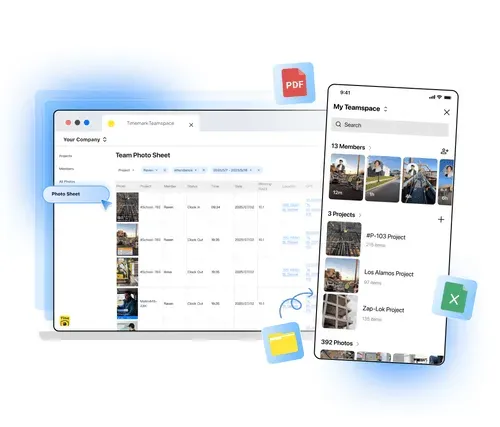
타임마크는 사진을 프로젝트/멤버 폴더에 넣고, 파일 이름에 타임스탬프와 위치 태그를 추가하므로 몇 초 안에 사진을 찾을 수 있습니다.
3. 사진보기
웹 포털이나 앱을 열어 갤러리/시트/지도 보기로 사진을 보세요.
4. 보고서 다운로드
정렬된 사진이 포함된 PDF 또는 Excel 보고서를 받으려면 "내보내기"를 탭하세요. 이해관계자에게는 라이브 프로젝트 링크를 보내십시오. 가입하지 않고도 진행 상황을 볼 수 있습니다.
건설 사진 문서화에 타임마크가 뛰어난 이유

사이트 사진 자동 정리
타임마크를 사용하여 프로젝트, 멤버, 날짜별로 사이트 사진을 정리하세요. 이 소프트웨어는 개인 사진과 작업을 분리하고 360° 및 비디오 파일을 지원하므로 쉽게 검색할 수 있습니다.

하나의 도구에 담긴 모든 주요 기능
현장 사진을 캡처하고, 프로젝트 진행 상황을 추적하고, 이해관계자와 공유하고, 보고서를 작성하세요. Timemark는 이 모든 것을 하나의 앱에 결합하여 작업 흐름에 적합하고 플랫폼 간 전환 시간을 절약합니다.

신뢰할 수 있는 시간 및 장소
타임마크는 모든 사진에 자동 타임스탬프와 위치정보 태그를 추가합니다. 이는 분쟁, 지불 또는 감사에 대한 신뢰할 수 있는 증거를 제공하므로 귀하의 작업은 확실한 증거가 됩니다.
활용 사례
일일 진행 상황. 마일스톤 추적
건설 사진 문서화를 위한 타임마크를 사용하세요. 프레임부터 콘크리트 타설까지 현장 사진으로 프로젝트 주요 일정을 캡처하는 최고의 도구입니다. 날짜 및 프로젝트별로 자동 정렬된 시각적 타임라인을 소유자 또는 GC와 공유하여 진행 상황을 입증하고 결제 속도를 높일 수 있습니다.
무료로 시작하기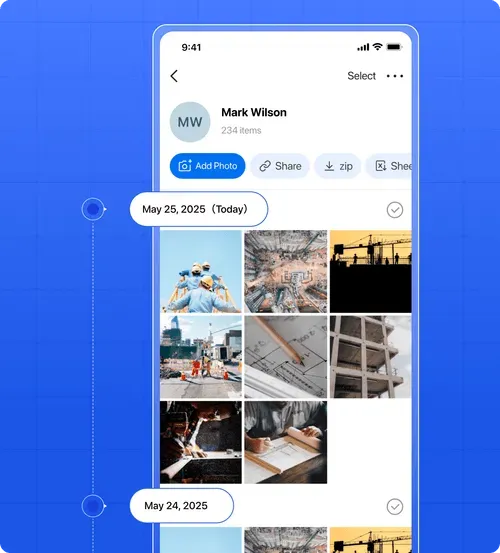
안전 규정 준수. 사이트 문서
건설 사진 문서화를 위한 타임마크를 사용하세요. PPE를 착용한 작업자를 포함하여 안전 준수 현장 사진을 찍을 수 있는 최고의 도구입니다. 타임스탬프와 위치 태그는 감사나 사고에 대한 신뢰할 수 있는 증거를 제공하며 팀은 안전 관행을 안전하게 공유하고 추적할 수 있습니다.
무료로 시작하기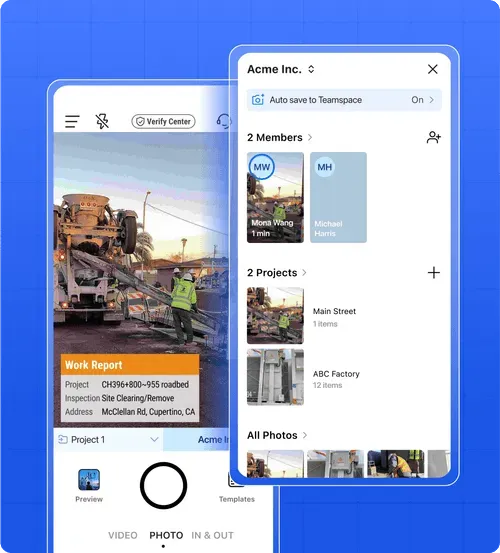
분쟁 해결. 항변 청구
건설 사진 문서화를 위한 타임마크를 사용하세요. 현장 사진을 캡처하고 정리하는 최고의 도구입니다. 타임 스탬프가 찍힌 프로젝트 이미지는 기술 수준이 떨어지는 등의 주장을 방어하고 사례를 입증하며 비용을 절약하는 동시에 분쟁 해결 속도를 높이는 데 도움이 됩니다.
무료로 시작하기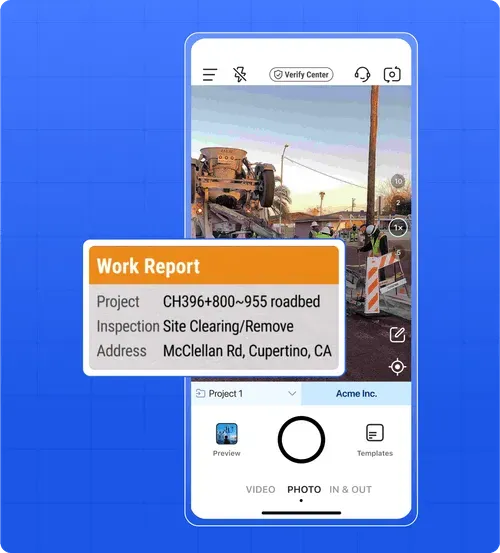
하청업체 협업. 작업 증명
Timemark의 건설 사진 문서화 소프트웨어는 하청업체가 완료된 작업의 현장 사진을 찍고 즉시 GC와 공유하여 지불을 증명할 수 있는 가장 좋은 방법입니다. 모든 프로젝트 사진을 한 곳에 보관하므로 여러 앱을 저글링할 필요가 없으므로 논쟁을 피하고 더 빨리 돈을 받을 수 있습니다.
무료로 시작하기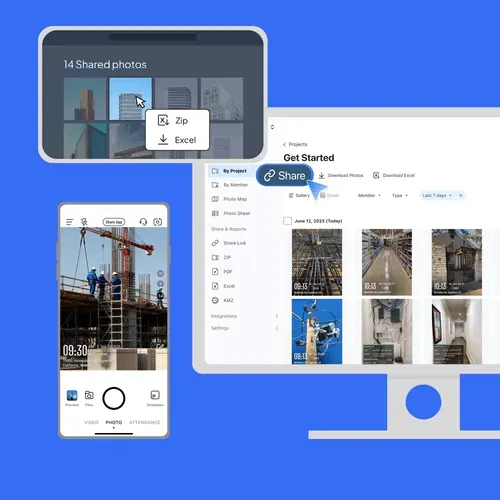
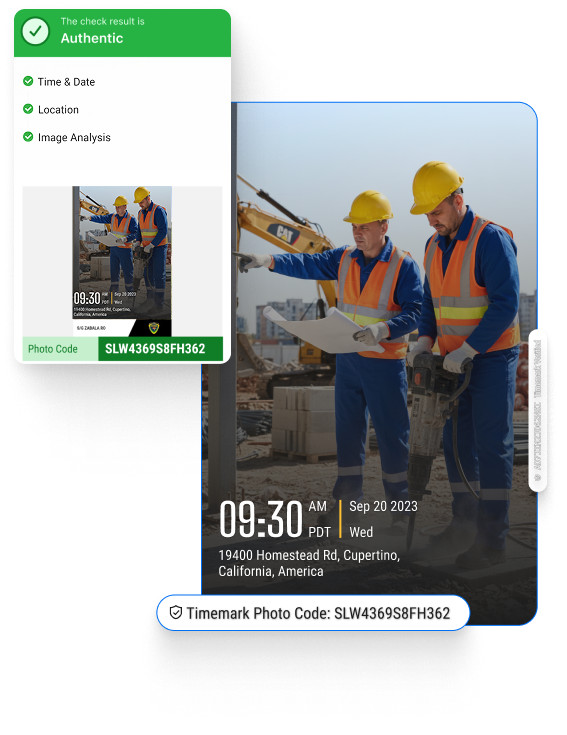
누구나 Timemark 사진을 확인할 수 있어요
Timemark는 네트워크 시간을 사용해요. 그래서 휴대폰 시간이 바뀌어도 사진에는 실제 시간이 표시돼요. 사진 코드는 Timemark 서버에 저장된 원래 시간, 위치, 사진 특징과 사진을 연결해요. 사진 코드가 있는 사진은 누구나 verify.timemark.com에서 무료로 확인하거나, 앱의 "사진 확인"에서 확인할 수 있어요.
- 휴대폰 시계를 바꿔도 사진에 실제 시간이 표시돼요.
- 가짜 GPS 위치는 "가상 위치는 표시되지 않음"으로 표시돼요.
- 사진 파일이나 메타데이터를 수정해도 저장된 기록은 바뀌지 않아요.
고객 사용후기
“Timemark는 작업 현장 사진을 프로젝트별로 자동 정렬하므로 더 이상 이메일을 뒤질 필요가 없습니다. 이를 통해 보고서 작성에 필요한 시간을 일주일에 3시간 절약할 수 있었고 타임스탬프를 통해 분쟁에서 승리할 수 있었습니다.”

“Timemark의 지도 보기는 사진이 촬영된 위치를 보여줍니다. 이는 유틸리티 작업에 매우 중요합니다. PDF 보고서를 내보내면 클라이언트 배달 시간이 절반으로 단축됩니다.”
“타임마크 링크를 통해 GC의 완료된 작업을 보여줍니다. 그들은 사진을 빨리 봅니다. 이 앱은 업무용 사진과 개인용 사진을 분리하므로 다시는 혼동하지 않습니다.”
“나는 사진을 정리하는 데 몇 시간을 보냈습니다. 이제 Timemark가 이를 수행합니다. 게다가 위치 태그는 우리가 감사 중에 안전 규칙을 따랐다는 것을 증명합니다.”
“우리 팀은 Timemark의 모바일 앱을 사용하여 숨겨진 작업 사진을 찍습니다. 회원별 자동 정리를 통해 현장 방문 없이 진행 상황을 확인할 수 있습니다.”
“Timemark는 예산에 맞춰 기업 수준의 문서를 제공합니다. 고객과 사진을 공유함으로써 우리의 평판이 높아졌습니다. 2번의 반복 작업이 생겼습니다!”
자주 묻는 질문
현장 사진은 타임마크로 안전하고 안전합니다
귀하의 건설 및 현장 사진에 대한 개인 정보 보호 및 안전 문제입니다. Timemark의 시공 사진 문서는 명확한 맥락을 위해 각 장면에 GPS와 날짜 스탬프가 포함되어 모든 장면을 안전하게 저장하는 가장 좋은 방법입니다. 업로드된 사진은 그대로 유지되며 편집이 허용되지 않습니다! 이를 통해 비디오 및 360° 콘텐츠를 포함하여 법적 또는 규정 준수에 민감한 프로젝트에 대한 신뢰할 수 있는 기록을 보장합니다.


무료 평가판을 시작하세요. 지금 건설 사진 문서를 단순화하세요!
지금 무료로 가입하여 프로젝트별로 사진을 자동 정렬하고, 이해관계자와 쉽게 공유하고, 지저분한 사진을 단 2분 만에 전문적인 문서로 바꿔보세요.
무료로 시작하기