
صور الموقع على الخريطة، مع تصميم KML متراكب
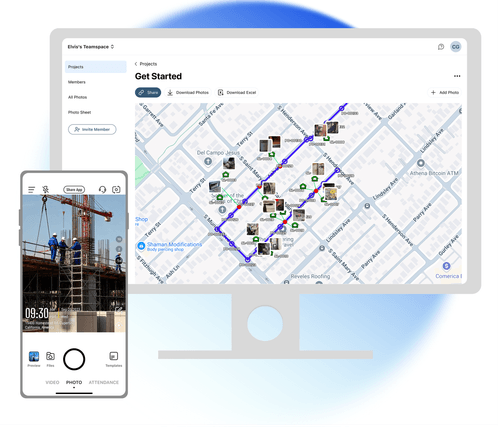
قم باستيراد تصميم KML الخاص بك إلى خريطة الصور الخاصة بك وتحقق من المخطط له مقابل الفعلي على الفور. تقوم الفرق الميدانية بالتقاط الصور، وتقارن الفرق المكتبية وتسجل الخروج، كل ذلك في مكان واحد. لا يوجد تصدير ولا توجد أداة GIS منفصلة.
موثوق به من قبل 3.7 مليون محترف وفرق ميدانية من






لا ينبغي أن يعني التحقق من العمل الميداني التوفيق بين أداتين منفصلتين
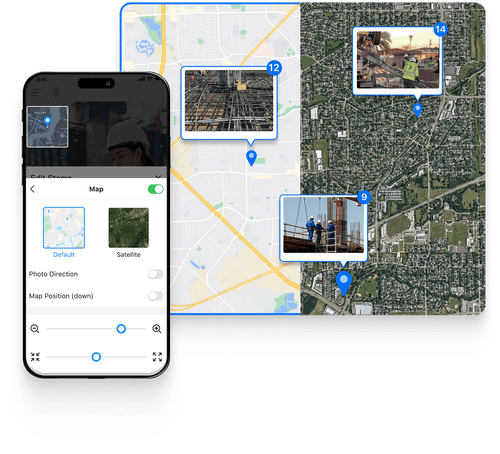
يتم وضع علامات جغرافية على صورك الميدانية، ويظل تصميمك موجودًا في ملف KML منفصل. حتى الآن، كانت المقارنة بين الاثنين تعني تحميل كليهما في أداة نظم المعلومات الجغرافية وتراكبهما يدويًا. مع Timemark، كل ذلك يحدث في مكان واحد. قم باستيراد تصميم KML مباشرة إلى خريطة الصور الخاصة بك وقارن بين التصميم المخطط له والفعلي
الميزات الرئيسية
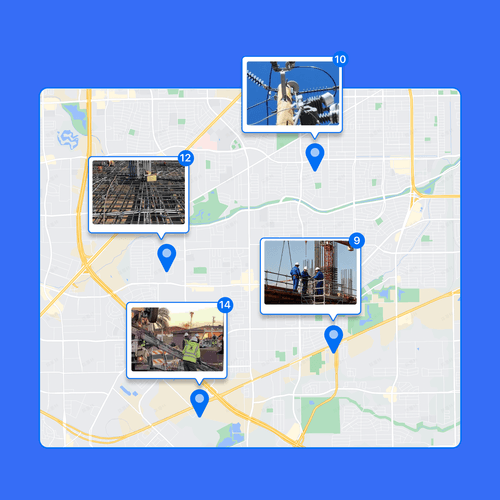
الصور على الخريطة، الموسومة تلقائيا
تحميل تطبيق Timemark
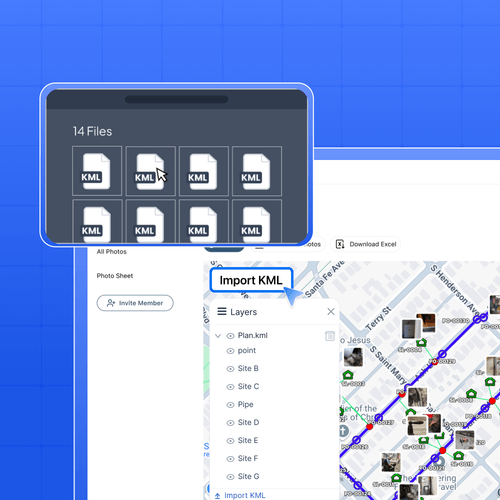
استيراد وتصميم تراكب KML
قم بتحميل ملف التصميم الهندسي الخاص بك مباشرة على خريطة الصور. يتم عرض النقاط والخطوط والمضلعات كتراكب KML على صورك مباشرةً. لا يوجد تحويل ولا أدوات خارجية.
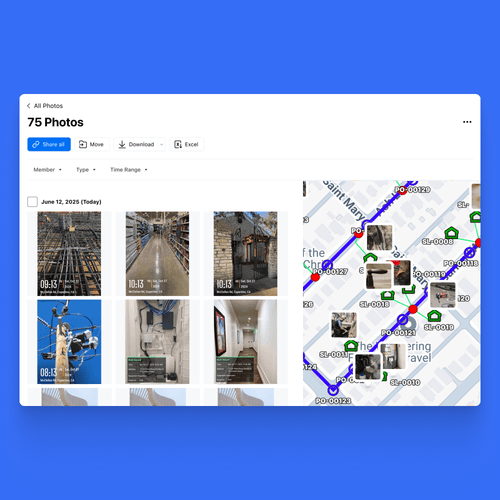
قارن بين المخطط والفعلي
شاهد مواقع الصور وإحداثيات التصميم في عرض واحد. اكتشف أين ينحرف العمل عن المخطط قبل أن يتحول إلى نزاع. مصمم لفرق العمل على الويب.
كيف يمكن التحقق من العمل الميداني مقابل تصميم KML الخاص بك؟
1. احصل على تطبيق Timemark انتقل إلى متاجر التطبيقات، وابحث عن Timemark وقم بتنزيله. افتح التطبيق، وامنح أذونات الكاميرا والموقع. هذا كل شيء. لا توجد خطوات معقدة، فقط بضع نقرات للاستعداد.2. التقط صورًا ذات علامات جغرافية اضغط على الكاميرا في Timemark لتصوير موقعك. تحصل كل صورة على نظام تحديد المواقع العالمي (GPS) التلقائي والطابع الزمني

بنيت للتحقق كما بنيت
تحقق من حفر الوصلات وفتحات اليد مقابل مسار الكابل المخطط قبل أن يتم تسجيل خروج كل جزء. قم بتراكب محاذاة التصميم على صورك الميدانية للفحص والقبول، والانحراف عن طريق الانحراف. تتبع العمل المبني مقابل خطط التصميم على خريطة واحدة، وسجل مرئي واضح للعملاء والمشرفين. صور الفحص المرجعي مع مناطق المسح المحددة، الموقع حسب الموقع.

لماذا تتحقق الفرق الميدانية من عملها في Timemark؟
قم بتركيب تصميم KML على صورك الميدانية وتحقق من كل جزء مقابل الخطة. اكتشف عمليات التثبيت الخاطئة أو العمل خارج المسار مبكرًا، وقم بإصلاحها قبل أن تتحول إلى إعادة صياغة أو قبول فاشل. تحمل كل صورة طابعًا زمنيًا والمكان المحدد الذي تم التقاطها فيه. وهذا دليل يمكنك الوثوق به. إذا اعترض أحد العملاء أو البائعين على العمل، فاعرض الأدلة ذات العلامات الجغرافية مقابل تصميم KML. لا مزيد من التخمين. تطلق الطواقم الميدانية النار على الهاتف المحمول، ويتحقق المكتب على الويب، وكل ذلك من خريطة واحدة. لا يوجد تصدير، ولا أدوات تبديل، ولا يوجد خلط بين الإصدارات. الجميع يعمل من نفس الصورة.

صورك الميدانية آمنة ومأمونة باستخدام Timemark
الخصوصية والأمان مهمان لصور البناء الخاصة بك. يحافظ التصوير الفوتوغرافي لتقدم البناء في Timemark على أمان كل لقطة باستخدام نظام تحديد المواقع العالمي (GPS) وطوابع التاريخ، مما يوفر سياقًا كاملاً لكل صورة. بمجرد تحميلها، تظل الصور كما هي تمامًا، ولا يُسمح بأي تعديلات. وثائق موقع جديرة بالثقة، ويمكن الاعتماد عليها دائمًا لتلبية الاحتياجات القانونية والامتثال.

الأسئلة المتداولة
جرب Timemark ‑ أفضل كاميرا للطابع الزمني مجانًا!
قم بتنزيل Timemark الآن لإضافة طوابع زمنية يمكن التحقق منها إلى الصور وإنشاء سير عمل منظم للصور لفريقك بسرعة.
حمّل تطبيق Timemark